Audio
MuseScore Studio Shortcut Profile
by Adx.cool
Overview
The complete MuseScore keyboard shortcut pack for Stream Deck.
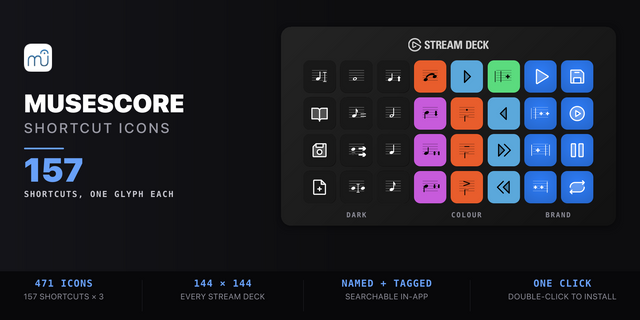
157 shortcuts across 9 categories — organized, scored by importance, and ready to install on Stream Deck Neo, Classic / MK.2, XL. Stop memorizing key combos. One tap, one action.
What's included:
• Notation & Text (24): Slur, Staccato, Tenuto, Accent, Marcato, and 19 more • Note Input (22): Note Input, Input by Duration, Re-pitch Existing Notes, Insert / Overwrite, Enter Note C, and 17 more • Durations (22): Whole Note, Half Note, Quarter Note, Eighth Note, 16th Note, and 17 more • Pitch (20): Pitch Up, Pitch Down, Up an Octave, Down an Octave, Diatonic Pitch Up, and 15 more • Playback & View (20): Play / Stop, Play from Selection, Pause and Select, Repeat Selection, Mixer, and 15 more • Navigation (18): Next Chord, Previous Chord, Next Measure, Previous Measure, First Element, and 13 more • Layout (16): Append Measure, Append Measures…, Insert Measure, Insert Measures…, Remove Selected Range, and 11 more • File & Edit (14): Save, Save As…, New Score, Open…, Close, and 9 more • Help (1): Open Handbook
Features: • 157 shortcuts across 8 category folders — Note Input, Durations, Pitch, Notation & Text, Navigation, Layout, Playback & View, File & Edit • The full duration ladder on its own keys — longa to 64th, augmentation dot, halve/double, duplet through septuplet • Note entry without the alphabet — A to G, rests, ties, chord tones and voices 1-4 under the fingers • Accidentals and pitch — sharp, flat, natural, enharmonic respell, chromatic and diatonic steps, octave jumps, thirds/fifths/octaves above and below • Articulation and text — slur, staccato, tenuto, accent, marcato, dynamics, lyrics, chord symbols, figured bass, rehearsal marks • Verified against MuseScore Studio 4.7.4's own shipped shortcut table, not a documentation page • Smart Profile auto-switch on Mac and Windows when MuseScore Studio takes focus
Install: double-click any .streamDeckProfile to import. The App binding is pre-filled to MuseScore — auto-activates on focus. If it didn't pre-fill, set it manually under Stream Deck → Preferences → Profiles → App.
Learn more about MuseScore: https://musescore.org
v2.0 — bigger key labels
Captions 2x bigger
Bigger folder names
Glyphs refitted
Same 157 shortcuts Every key caption is now drawn at the largest size its key can hold, up to twice the old size, and folder names grow to match. Bindings are unchanged, from MuseScore Studio 4.7.4's shipped shortcut table. Re-install the .streamDeckProfile to pick up the new keys.
Version 2
Oct 14, 2026
You might also like