Utilities
Nixie Time
by donburi-labs
Overview
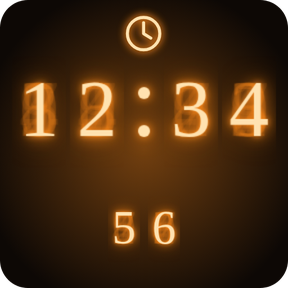
Nixie Time puts glowing nixie-tube displays on your Stream Deck keys.
Actions
- Clock - current time (HH:MM) with small seconds and a blinking colon. Optional 12-hour mode.
- Stopwatch - press to start/stop, hold to reset. A glowing ring around the key fills once per minute.
- Countdown - set minutes and seconds, press to start/pause, hold to reset. A bar shows the time left, and the display flashes at zero.
- Date - month.day with the weekday or the year.
Every action has its own look, so you can tell them apart at a glance. Pick orange, cyan, green or pink for each key in the settings. Nothing to find, nothing to paste: the nixie look is built in.
Requirements
Stream Deck 7.1 or later, Windows 10 or later. macOS version planned.
More from donburi-labs
- Nixie Icon Pack Animated: https://marketplace.elgato.com/product/nixie-icon-pack-animated-96c2ee2d-9fa2-44ce-8978-f911e6e3b804
- Nixie Icon Pack (free): https://marketplace.elgato.com/product/nixie-icon-pack-18727bf7-f8a9-411f-b6bd-54c018d5f4ad
- Nixie Clock: https://marketplace.elgato.com/product/nixie-clock-bdba2541-a700-46cd-805a-8614429a2dbd
Credits: digits are drawn in Nixie One (SIL Open Font License 1.1).
Initial release.
- Clock, Stopwatch, Countdown and Date actions
- Four glow colors (orange, cyan, green, pink), set per key
- 12-hour mode for Clock, weekday/year option for Date
Version 1
Oct 19, 2026
Details
Type
Utilities
OS
Windows
Compatibility
Stream Deck 7.1 or later
Size
1.73 MB
Version
1
Language
English
Support
Profiles
No
Dial support
No
Neo Infobar support
No