Gaming
NMS Deck
by TeaTime
Overview
Live No Man's Sky on your Stream Deck. Built and tested on the Cosmos update (7.x).
Requires the Steam version of No Man's Sky, Python and NMS.py. Other versions (Xbox app, Game Pass, GOG) are not supported. NMS Deck reads the game through NMS.py, a free, open-source modding framework for No Man's Sky, which runs on Python 3.9 to 3.13 (not 3.14). Both are free, and the plugin's setup installs NMS.py for you once Python is on your PC. Without them the keys cannot show anything from the game.
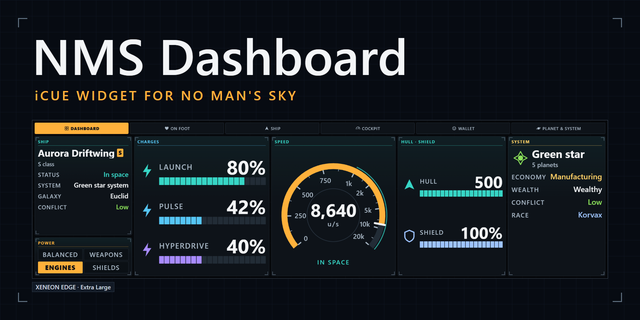
While you play, the keys show what the game knows about you: your health and shield, your ship's hull, the charge left in your launch thrusters, pulse engine and hyperdrive, your exosuit's life support and hazard protection, your units, nanites and quicksilver, and how fast you are going.
It reads the world around you too. Land on a planet and the deck names it and tells you its weather, flora, fauna and resources, and whether there is scrap to salvage, in the game's own words. In any system it shows the star, the economy, the level of conflict and who lives there, along with your galactic coordinates and portal address. In the cockpit it shows where your ship's power is going: engines, weapons, shields or balanced.
Information first
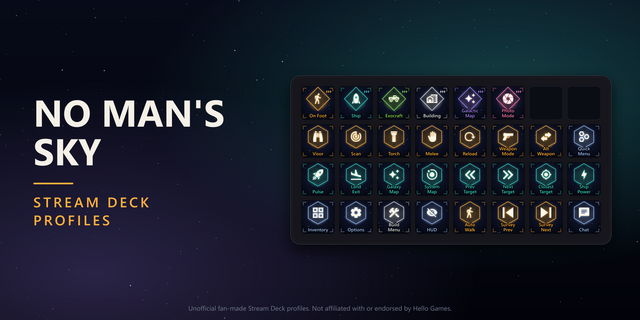
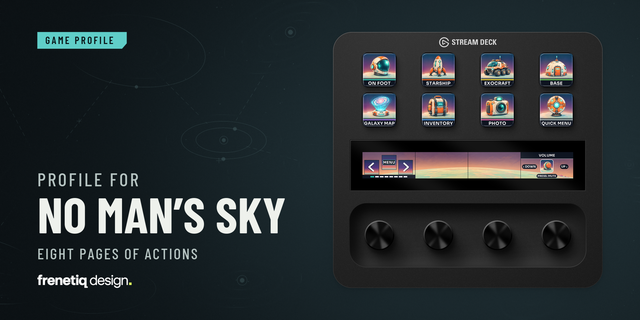
One key on your own profile opens a layout made for your deck, with pages for on foot, the ship, the exocraft, the galactic map, building and photo mode. Your hull and charges become bars that stretch across rows of keys, and on a Stream Deck + they sit on the touch strip. The game's own controls are a key away whenever you want them. And the layout follows you: climb into your ship and the deck turns to the Ship page, step out and it turns back.
How it works
NMS Deck has two halves. The NMS Deck bridge, a small open-source mod for NMS.py, reads the game once a second and writes what it sees to a file on your PC, and the plugin draws the keys from that file. Setup lives in any NMS Deck key's settings: it checks for Python, installs NMS.py and the bridge with a press each, and a Launch key starts the game with them. The bridge only reads. It changes nothing in your game or your save, and nothing leaves your PC.
What you need
No Man's Sky, the Steam version, on Windows.
Python 3.9 to 3.13, not 3.14 and not the Microsoft Store version. One command installs 3.13: winget install -e --id Python.Python.3.13 (the setup guide at teatimeservers.ca has it with a copy button).
NMS.py, installed from the plugin's setup with one press.
Stream Deck 7.1 or newer.
Good to know
NMS.py finds its way around the game by patterns, so after a big No Man's Sky update some readings can pause until NMS.py catches up; the bridge finds most of what it reads by shape, so most updates pass it by. In a space station the game does not say whether you are sitting in your ship, so the layout waits until you fly out. And when there is nothing live to show, the keys say why: the game is closed, you are at the menu, or it was started without NMS.py.
We made NMS Deck because we wanted the deck beside the keyboard to be part of the game: a glance down to see how much hyperdrive is left, what this planet is like, or where your power is going mid-fight.
NMS Deck is an unofficial fan project, not affiliated with or endorsed by Hello Games. No Man's Sky is a trademark of Hello Games Ltd. NMS.py is a separate open-source project.
NMS Deck 0.3.0
French and Spanish. Every key, dial, page and setting now reads in English, French or Spanish, using No Man's Sky's own French and Spanish for the controls, system details and charges. A new Language setting (under Options in any NMS Deck key's settings) follows Stream Deck's language, or you can pick one. Each deck's layout comes in all three languages.
Planet details show the game's own words, in the language the game is set to.
Numbers are written the way each language writes them (4 215 880 units, 64 % in French and Spanish).
When the NMS Deck key can't open a layout, its note now shows on two lines instead of being cut short.
Also since 0.2.10
The plugin now keeps the NMS Deck bridge up to date by itself, with bridge 0.6.2 included.
The solar system and planet readouts work again on the latest game build.
The bridge keeps updating its data file while the NMS Dashboard widget on the XENEON EDGE has it open.
Version 0.3
Nov 6, 2026
Details
Type
Gaming
OS
Windows
Compatibility
Stream Deck 7.1 or later
Size
3.56 MB
Version
0.3
Language
English
French
Spanish
Support
Neo Infobar support
No
Profiles
Yes
Dial support
Yes
Additional links
You might also like