Development
Obsidian Hotkeys
Overview
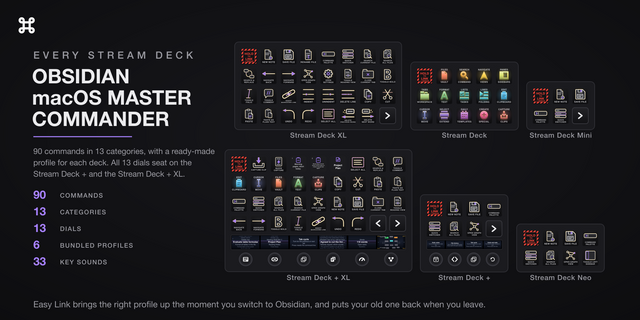
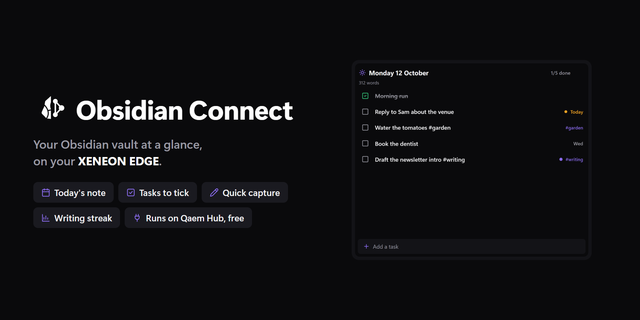
All 90 Obsidian commands fire from a key, hotkey or no hotkey: the 41 Obsidian leaves unbound run straight through its official command line interface. Six bundled profiles, one for every Stream Deck. Thirteen dials fly your canvas, browse your clipboard history, walk the file tree and read your vault live. 13 categories, from Files & Vault and Search & Command to Edit & Clipboard and Daily & Templates.
ONE SETUP STEP
Turn on Obsidian's command line interface once: Settings, General, Command line interface. It powers the 41 unbound commands, the live dials and the capture keys. If a key alerts or a dial screen stays dim, that toggle is off.
EVERY COMMAND FIRES
Obsidian gives 49 of these 90 a default hotkey and those send the keystroke. The other 41, its daily note, folding, sidebar, template and canvas commands, run through the CLI instead. You bind nothing. A keystroke-only plugin cannot reach a command with no default hotkey until you assign one. These 41 arrive working.
THIRTEEN DIALS
Six draw live readings on the touch screen, read through the CLI:
- File Tree Navigator: walk the explorer while your caret stays in the editor.
- Command Browser: every command your Obsidian registers, core and community. Press runs it.
- Link Compass: backlinks, outgoing links, recent files.
- Vault HUD: word count, open tasks, last edit, backlinks.
- Clipboard Stack: turn to browse your clipboard history, press to deliver, hold to pin.
- Canvas Pilot: a live minimap of your canvas. Turn to zoom, press to fit, hold and turn to walk nodes.
Seven work the app directly: Text Size (a point per click, press switches light and dark mode), App Zoom, Outline Fold, Daily Note Navigator, File History, Tab Cycle and Undo Redo.
The strip screens are drawn edge to edge, so text is as large as the glass allows and the Command Browser rows never collide.
Capture Clip pushes your selection or clipboard onto that stack, four Clip Slot keys are fixed windows onto pinned clips, and Quick Capture appends to today's daily note.
RUN ANY COMMAND THROUGH THE CLI
The Obsidian Command action runs ANY palette command, core or community plugin, no keystrokes, no focus stealing. Its dropdown is read live from your running app, so Smart Connections, Copilot, Whisper, Templater and every plugin you add appear on their own. Active Note shows your open note live on the key face.
EASY LINK, BUILT IN
Nothing else to install. Hold the key about a second with Obsidian in front and the deck binds it to this plugin's profile, which switches in whenever Obsidian takes focus and hands your previous one back when you leave. A short press does nothing, so a stray tap never relinks. Smart Profiles switch on an app too, but you build those in the app one at a time; Easy Link mints the link from the deck, in one press.
SIX READY-MADE PROFILES, ONE PER DECK
- Obsidian Hotkeys, 15 keys: 15 pages, a color-coded hub, one page per category with all 90 commands pre-placed, and a capture page.
- Obsidian Hotkeys Plus, Stream Deck +: 4 pages, all 13 dials.
- Obsidian Hotkeys Plus XL, Stream Deck + XL: a 6-page hub, all 13 dials.
- Obsidian Hotkeys XL, 32 keys: the full board.
- Obsidian Hotkeys Mini, 6 keys: a curated starter set.
- Obsidian Hotkeys Neo, 8 keys: the same set.
Easy Link sits top left on all six, one per deck.
ONE-CLICK HOTKEY SYNC
Click Sync and the key reads the real binding out of your keymap, overrides included. 61 of the 90 commands carry an Obsidian command id and sync this way; the other 29 are raw editor keystrokes and the button says so.
WHAT'S INCLUDED
- 13 category actions covering 90 commands: pick the command and the key wears its artwork. Every key remappable, Multi Action ready
- 34 actions, six bundled profiles, and 33 press sounds, silent by default, plus your own through our free Sound Sampler plugin
Six bundled profiles, one for every Stream Deck.
Four new profiles join the ones for the Stream Deck and Stream Deck +. The Stream Deck XL profile fills the 32-key board. The Stream Deck Mini and Stream Deck Neo carry a curated starter set: new note, save, command palette, quick switcher, search, graph view and left sidebar, with Easy Link top left. Easy Link binds the right profile to each deck, so a two-deck desk gets the right layout on both.
The Stream Deck + XL profile is a six-page hub. Its pages are Home, Capture, Edit & Select, Cursor & Lines, Format & Canvas, and Files, Search & Navigate, with all 13 dials seated across them.
The touch strip screens are redrawn edge to edge. The padding is gone, so text is as large as the glass allows, and the Command Browser lists real command names with no colliding rows.
All 90 commands fire, hotkey or no hotkey. The 41 Obsidian leaves unbound run through its official command line interface with nothing for you to assign. Turn it on once in Settings, General, Command line interface.
Stream Deck + page 2 drops Unindent from its last slot to make room for the Next Page key. Unindent stays on the 15-key profile's Lists & Tasks page and in the command dropdown.
Reinstall the bundled profiles to pick up the new pages and keys.
Version 3
Aug 13, 2026
Details
Type
Development
Monitoring
Productivity
OS
Windows
Compatibility
Stream Deck 6.9 or later
Size
3.64 MB
Version
3
Language
English
Support
Profiles
Yes
Dial support
Yes
Additional links
You might also like