Business
OneNote Commander
Overview
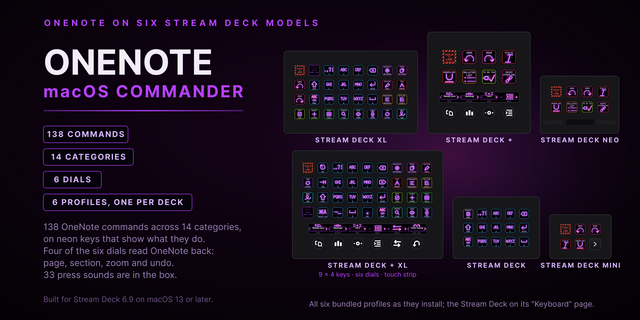
Hold the Easy Link key while OneNote is in front and the link is made: the deck follows the app you are in. OneNote Commander puts Microsoft OneNote on your Stream Deck and Stream Deck +. Four dials drive page, section, zoom, and font size, while 123 commands sit on labeled keys across 13 categories. Live keys read and control OneNote through its own automation API, so this is the first Stream Deck plugin that actually controls OneNote. Everything before it was icon art.
EASY LINK, BUILT IN
The Easy Link module is built in, nothing else to install. Hold the key about a second while OneNote is in front and the deck binds it to this plugin's profile. The profile switches in whenever OneNote takes focus, and your previous one returns when you leave. No setup pages, no paths, no window titles to type. A short press does nothing, so a stray tap never relinks. Easy Link sits on the top-left key of both profiles, and lock, fail and clear cues ship with it.
STREAM DECK + DIALS
Page and section strips read their live names straight from OneNote:
- Page: turn to step through the section's pages, press for a new page.
- Section: turn to walk the notebook's section tabs, press for a new section.
- Zoom: turn to zoom in and out, press to toggle full page view. Zoom sends Ctrl and scroll, OneNote's only zoom gesture, so it acts on the window under your pointer.
- Font Size: turn to grow or shrink the selected text, press to clear formatting.
Tap either half of a strip to step it like one dial click; a closed OneNote falls back to the labels.
WHAT'S INCLUDED
123 OneNote commands across 13 categories, from navigation, pages and editing through tags, tables, search, and sync. Every command sits on a labeled key, so you read the key, not a shortcut list, and any key is remappable. Two profiles ship: a 15-key hub with one page per category plus To-Do and Search pages, and a Stream Deck + profile with the four dials and seven starter keys. Undo, Redo, Bullets, and Numbering read OneNote's real UI state, so a key dims when its command does not apply.
JUMP TO ANY PAGE
Pick any notebook, section, or page from a live tree in the key's settings. The key navigates OneNote straight there in the background, no sidebar drilling. These are the favorites OneNote never shipped.
ALWAYS KNOW WHERE YOU ARE
The Status key shows the live Notebook / Section / Page breadcrumb, even when OneNote is buried behind a call. While an audio or video recording runs it wears a recording badge, so the mic is never silently live. An optional Follow mode switches the deck to the recording controls while capture runs.
CHECKBOXES BECOME BUTTONS
Press the To-Do Dashboard key and the current page's checkboxes land on 12 keys, open-task count in view. Pressing one toggles the real checkbox through the API, not a fragile keystroke.
SEARCH RESULTS YOU CAN PRESS
Set a query on the Search key. One press searches every open notebook and lands the top 12 hits on keys. Press a hit to open that page: answering "what did we decide about X" is two presses.
NO SHORTCUT? STILL A KEY
Record, pause and stop for audio and video capture, Quick Note, and Export Page to PDF all fire through the automation API. OneNote has no shortcut for any of them. PDF export drops the page on your Desktop.
PER-KEY SOUNDS
Every key can play a sound when you press it, with 33 in the box including the three Easy Link cues. Pick one per key in the property inspector, or leave it silent. Pairs with our free Sound Sampler: record any sound on your PC and it appears in the Key Sound picker.
OneNote Commander now ships the Easy Link module built in.
Easy Link. Hold the Easy Link key about a second while OneNote is in front and the deck binds it to this plugin's profile. The profile switches in whenever OneNote takes focus, and your previous one returns when you leave. No setup pages, no paths, no window titles to type. A short press does nothing, so a stray tap never relinks. Easy Link sits on the top-left key of both bundled profiles and works as a key or as a Stream Deck + dial. Three cues ship with it: lock, fail and clear.
Sounds. Three Easy Link cues join the bundled set, bringing it to 33.
Profiles. Both bundled profiles were rebuilt to seat Easy Link in the top-left slot. The Stream Deck + profile now carries Easy Link plus seven starter keys alongside the four dials.
Fixed: key press sounds now play on PCs without PowerShell 7 installed. Sound playback uses Windows PowerShell 5.1, which is included with Windows 10 and 11.
Works with the OneNote desktop app for Windows (Microsoft 365 or the free desktop version). Not compatible with the retired OneNote for Windows 10 store app, OneNote for the web, or OneNote for Mac.
Version 2.1
Aug 5, 2026
Details
Type
Business
Development
Productivity
Utilities
OS
Windows
Compatibility
Stream Deck 6.9 or later
Size
3.16 MB
Version
2.1
Language
English
Support
Profiles
Yes
Dial support
Yes
You might also like