Monitoring
PingWidget
Overview
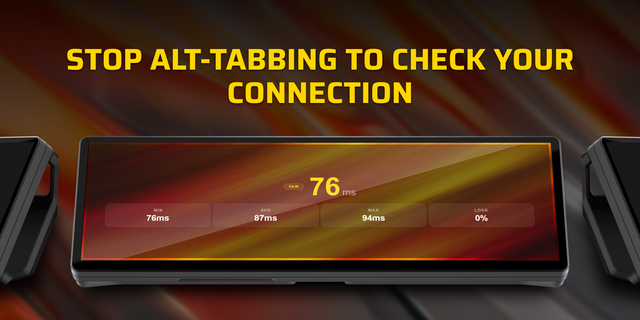
Real-time network latency, jitter, and packet loss monitor built specifically for the Corsair Xeneon Edge display.
PingWidget runs directly on your dashboard to provide continuous visibility into your internet connection and gaming server responsiveness without cluttering your main display.
Features
Live Latency Sparkline: Real-time smoothing graph visualising latency trends and stability over time.
Core Telemetry Metrics: Live readout of current latency, rolling average (Avg), jitter calculation, minimum/maximum extremes, and dropped packet tallies (Loss / Err).
One-Click Target Presets: Quickly toggle between Cloudflare (1.1.1.1), Google, Steam, and Discord servers using the interactive on-widget menu.
Custom Endpoints: Monitor your own router, game server, or web host via the native iCUE settings panel.
Chevron Activity Tracker: Visual ping-heartbeat bar that sweeps as requests execute.
Pause / Resume Control: Pause background network requests at any time with a single tap.
Native iCUE Customisation: Toggle telemetry rows on or off and tune your ping polling interval from 500 ms to 10 seconds.
Technical Note: HTTP Ping vs ICMP
PingWidget operates inside iCUE's sandboxed web runtime. Because browser sandboxes cannot send raw Layer 3 OS ICMP echo packets, the widget measures application-layer HTTPS round-trip timing. Readings will sit slightly higher than terminal ping commands due to TLS encryption handshakes and socket scheduling, providing an accurate measure of real-world application responsiveness.
Free community utility created by Hall Solutions.
What's New in v1.4.0:
• Fixed random transparency flashing and compositor flickering on transparent desktop backgrounds.
• Redesigned network outage & offline display for a cleaner, high-contrast dashboard aesthetic.
• Unobstructed sparkline graph: live trace plunges directly into an alert flatline without intrusive pop-up banners.
• Replaced blurred cross icons with a clean 4-bar ghost signal meter.
• Improved connection loss detection for router cutoffs and disabled network adapters.
• Refactored internal architecture into lightweight modular components for faster boot times.
Version 1.4
Oct 15, 2026
Details
Type
Monitoring
Utilities
Device
XENEON EDGE
OS
Windows
Size
71.97 KB
Version
1.4
Language
English
Support
Dashboard Sizes
Extra large
Large
Medium
Small
Recommended Orientation
Horizontal
Interactive
Yes
You might also like