Development
Pocket AI Usage for Claude
Overview
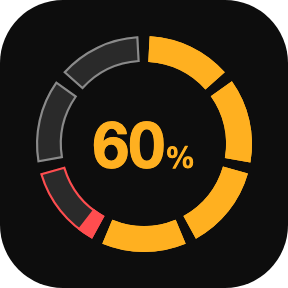
Pocket AI Usage for Claude shows how much of your Claude subscription you have used and whether you are ahead of pace, on any Stream Deck key. On Stream Deck +, a dial switches the model and effort of your Claude Code session and launches new ones. For Claude Pro and Max on macOS.
Usage keys
• Session (5 hours), weekly and weekly Fable windows, each with its time to reset
• Pace colors: green under pace, amber up to 10 points over, red beyond that or near the limit
• Five charts: ring, bar, half gauge, all windows on one key, focus + others
• At 100%, eight countdown styles show the time to reset, including split-flap tiles
• Your own colors, titles and units. Press to refresh, hold to open the usage page
Claude CLI Dial (Stream Deck +)
• Turn to choose the model or the effort, press to apply it to the Claude Code session in the front app
• Works in Terminal, iTerm, Ghostty, Warp, VS Code and Cursor
• Launches a new Claude Code session or the Claude desktop app
• Optional usage view on the touch strip, in five layouts
Requirements
macOS 13 or later, Stream Deck 7.1 or later, and a Claude Pro or Max plan signed in through Claude Code.
Privacy
The plugin reads your Claude Code sign-in from the macOS Keychain and sends it only to api.anthropic.com. Nothing is written to disk or logs. Not affiliated with Anthropic.
Support
support@pocketmoney.freshdesk.com. Please mention the plugin name.
First release.
• Usage keys for the session (5 hours), weekly and weekly Fable windows, with pace colors and time to reset
• Five charts: ring, bar, half gauge, all windows, focus + others
• Eight countdown styles when a window reaches 100%
• Claude CLI Dial for Stream Deck +: choose model and effort, apply them to the Claude Code session in the front app, or launch a new one
• Optional usage view on the touch strip, in five layouts
Requires macOS 13 or later and Stream Deck 7.1 or later.
Version 1
Oct 14, 2026
Details
Type
Development
Monitoring
Utilities
OS
Mac
Compatibility
Stream Deck 7.1 or later
Size
201.55 KB
Version
1
Language
English
Support
Profiles
No
Neo Infobar support
No
Dial support
Yes