Monitoring
Pocket Tools for Apple Mail
Overview
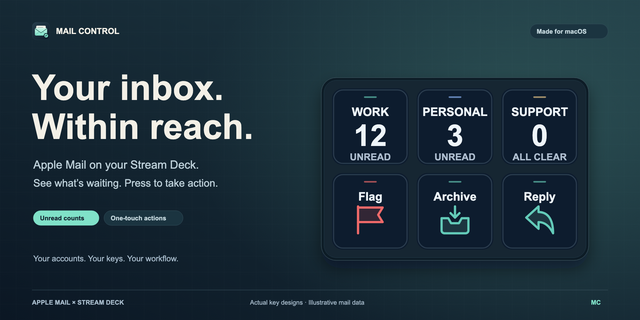
Pocket Tools for Apple Mail brings Apple Mail to Stream Deck and Galleon 100 SD keys and dials: unread counts, latest email, alerts, template drafts, and archive, flag or move keys.
Unread count
One mailbox or all, optionally by sender or subject
Number, or a ring that turns green at inbox zero
Latest email
Sender, subject and age of the newest match
Alert
Lights up on a matching new email
Compose
Drafts from a template, never sent
Archive, Flag and Move
Act on Mail's selection or the latest match, never one not on the key
Inbox dial (Stream Deck + and Galleon)
Turn through the 10 newest matches; push to open, or archive if set
Mailbox dial (Stream Deck + and Galleon)
Up to 6 mailboxes or filters: turn for unread counts, push to open
On every key and dial
Long labels wrap or scroll; your colors
Tap to open; hold for Mail or your own commands
Red border with Mail closed
Works on
Every Stream Deck, Stream Deck Mobile and Corsair Galleon 100 SD; dials on Stream Deck +, + XL and Galleon
Galleon: double push to refresh, double push and hold for Mail
Requirements
macOS 13 or later, Stream Deck 7.1 or later (7.2 for Galleon), Apple Mail and permission to control it.
Privacy
It works only through Apple Mail on your Mac and sends nothing elsewhere. It changes mail only on Archive, Flag, Move or an Inbox dial set to archive, and never sends email.
Support
support@pocketmoney.freshdesk.com. Please mention the plugin name. Not affiliated with Apple.
New in 1.2
Hold any key to open Apple Mail, as before, or to run your own commands in Terminal or in the background
First release (1.1)
Unread count: per mailbox or filter, as a number or a ring that turns green at inbox zero; tap to open the mailbox
Latest email: sender, subject and age; tap to open it
Alert: lights up when a new matching email arrives
Compose: a pre-filled draft from a template, never sent
Archive, Flag and Move: on the selected message or the latest matching one, never on a message the key didn't show
Inbox dial for Stream Deck +: turn through the newest 10 matching emails, push to open the one shown, or, if you turn it on, archive it
Mailbox dial for Stream Deck +: up to 6 mailboxes or filters with their unread counts; push to open one
Long labels on two lines or scrolling; your own colors per key and dial
With Mail closed, a red border appears; hold a key or touch and hold a dial to open Apple Mail
Corsair Galleon 100 SD: double push a dial to refresh, double push and hold to open Apple Mail
Requires macOS 13 or later, Stream Deck 7.1 or later and Apple Mail.
Version 1.2.1
Nov 6, 2026
Details
Type
Monitoring
Productivity
Utilities
OS
Mac
Compatibility
Stream Deck 7.1 or later
Size
275.08 KB
Version
1.2.1
Language
English
Support
Profiles
No
Neo Infobar support
No
Dial support
Yes
You might also like