Business
Power BI Deck
Overview
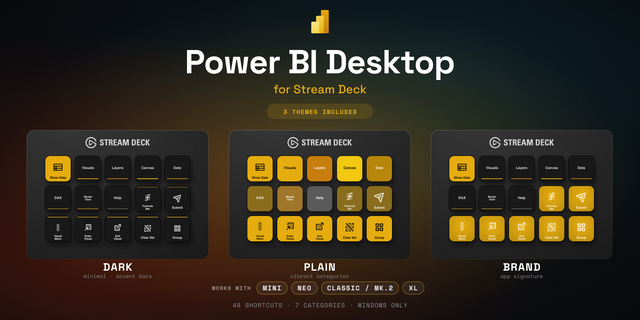
Physical buttons for Power BI Desktop.
Power BI Desktop has no keyboard shortcut for its most-used ribbon actions - Transform Data, Refresh, New Measure, Publish, and dozens more. If you build reports, you click the ribbon hundreds of times a day. Power BI Deck puts those commands on your Stream Deck, one press away.
What's included
- 2 configurable command keys - "Report Command" and "Power Query Command". Drop either on your deck as many times as you like and pick its function from a grouped dropdown; the key's icon updates to match your choice.
- 4 ready-to-use preset keys - Open Power Query, Refresh, New Measure, Publish.
- A ready-made "Power BI" profile - a complete key layout you can switch to the moment you install, so you're productive immediately.
The ~40 commands you can put on a key
- Home & File: Get Data, Open Power Query, Refresh, Publish, Data source settings, Save, Open, Save As, Export, Import, Options
- Modeling: New Measure, New Column, New Table, Quick Measure, Calculation Group, Manage Relationships, Manage Roles, Mark as Date Table
- Insert: New Visual, Text Box, Image, Buttons, Shapes, Key Influencers, Decomposition Tree, Narrative, Sparkline
- View & Optimize: switch to Report / Table / Model / DAX Query view, Performance Analyzer, Refresh Visuals, Apply All Slicers
- Column tools: Data Type, Format, Percentage, Comma Style, Summarization, Data Category, Sort by Column, Data Groups
- Power Query editor: Choose Columns, Remove Columns, Merge Queries (and Merge as New), Append Queries (and Append as New), Group By, Use First Row as Headers, Refresh Preview, Advanced Editor, Close & Apply
How it works Press a key and Power BI Deck runs the matching ribbon command in the Power BI Desktop window that's currently in front. It uses Windows UI Automation - the same accessibility technology screen readers use - to activate the actual ribbon button by its internal identifier. Because it targets the button itself rather than a screen position, it works no matter your monitor resolution, display scaling, or even the ribbon's display language.
The Power Query editor is a separate, classic window that doesn't expose its ribbon to automation, so there Power BI Deck uses that ribbon's built-in keyboard accelerators (Alt-KeyTips) instead. Either way, you just press a key and the command runs.
Smart, context-aware keys
Your deck shows what's usable at a glance: report commands dim when Power BI Desktop isn't open, Power Query commands dim unless the editor is open, and Column tools light up only when a column is selected - so you never press a key that can't do anything.
Requirements
- Windows 10 or 11 (Windows only - Power BI Desktop isn't available on macOS)
- Stream Deck software 7.1 or later
- Power BI Desktop installed
Privacy
Power BI Deck runs entirely on your own machine against Power BI Desktop. There's no sign-in, it needs no account, and it sends nothing over the network.
## 1.0.0 - first release
Physical buttons for the Power BI Desktop actions you click all day.
Two configurable command keys - drop them on your deck as many times as you like and pick a function per key from a grouped list; the icon updates to match:
Report Command - Home & File (Get Data, Power Query, Refresh, Publish, Data source settings, Save, Open, Save As, Export, Import, Options), Modeling, Insert, View & Optimize, and Column tools (which light up only when a column is selected).
Power Query Command - Choose Columns, Merge & Append (incl. "as New"), Group By, Close & Apply, Advanced Editor, and more.
Four ready-to-use preset keys: Open Power Query, Refresh, New Measure, Publish.
Smart, context-aware keys - report keys dim when Power BI Desktop isn't open, Power Query keys dim unless the editor is open, so your deck always shows what's available.
Includes a ready-made "Power BI" profile - a full layout you can switch to right after installing.
Commands are driven by Windows UI Automation, so they work regardless of screen resolution, scaling, or ribbon language - nothing leaves your machine, no account or sign-in needed.
Requires: Windows 10/11, Stream Deck 7.1+, and Power BI Desktop. Windows only.
I have send a demo video via e-mail to demonstrate the usage!
Version 1
Aug 13, 2026
Details
Type
Business
Productivity
OS
Windows
Compatibility
Stream Deck 7.1 or later
Size
125.86 KB
Version
1
Language
English
Support
Dial support
No
Profiles
Yes
You might also like