Monitoring
Proxmox VE Controller
by makrofon
Overview
Take command of your Proxmox VE environment directly from your Stream Deck.
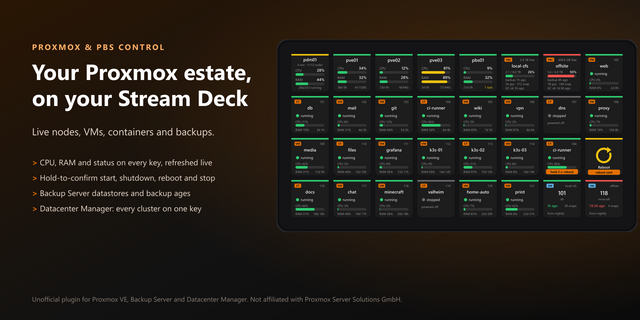
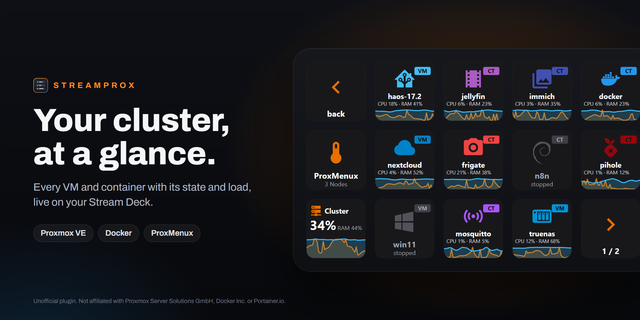
Proxmox VE Controller brings powerful virtualization management to your fingertips. Monitor server status, control VMs and containers, and keep an eye on system resources—all without leaving your desk or opening a browser.
Transform your Stream Deck into a powerful Proxmox VE command center. Whether you're checking on your homelab from across the room or need instant access to VM controls, Proxmox VE Controller puts your virtual infrastructure at your fingertips.
Key Features:
Guest Control — Start, stop, restart VMs and containers with one press. Color-coded status display (green=running, red=stopped, yellow=paused)
Resource Monitoring — Real-time CPU, memory, and storage metrics with configurable warning thresholds
Cluster Overview — Bird's-eye view of nodes, guests, and aggregate utilization
Task Monitor — Track backups, migrations, and other background operations
Backup & Restore — Trigger backups and restore from snapshots
Snapshot Manager — Create and rollback snapshots instantly
Network Monitor — Real-time throughput and per-interface statistics
This plugin is not affiliated with or endorsed by Proxmox Server Solutions GmbH. Proxmox is a registered trademark of Proxmox Server Solutions GmbH.
NEW: Replace Guest IDs with your own custom Display Name.
NEW: Shortcut for opening the Console via long-press for the Guest Control & Status action.
Version 1.0.0.19
May 5, 2026
Details
Type
Monitoring
Productivity
Utilities
OS
Mac
Windows
Compatibility
Stream Deck 7 or later
Size
38.62 MB
Version
1.0.0.19
Language
English
Support
Profiles
No
Dial support
Yes
You might also like