Creative Tools
PrusaSlicer Shortcut Profile
by Adx.cool
Overview
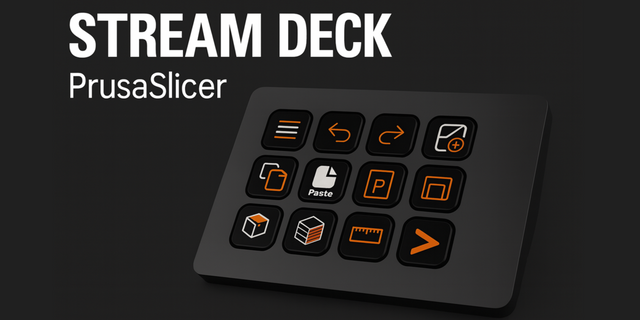
The complete PrusaSlicer keyboard shortcut pack for Stream Deck.
81 shortcuts across 6 categories — organized, scored by importance, and ready to install on Stream Deck Neo, Classic / MK.2, XL. Stop memorizing key combos. One tap, one action.
What's included:
• Commands (32) • Plater (31) • Preview (11) • Objects (3) • Workflows (3) • Help (1)
Features: • Read from PrusaSlicer's own source, not from a blog post • Both platforms, with the per-OS branches resolved from the code • Folders mirror the app's own shortcut dialog, which is what disambiguates the keys • Nudge by 10 mm and rotate by 45 degrees without touching the keyboard • Three one-tap workflow chords: arrange, slice, export • A distinct icon on all 81 keys
Install: double-click any .streamDeckProfile to import. The App binding is pre-filled to PrusaSlicer — auto-activates on focus. If it didn't pre-fill, set it manually under Stream Deck → Preferences → Profiles → App.
Learn more about PrusaSlicer: https://www.prusa3d.com/prusaslicer/£
Setup (required for some keys)
Folders match PrusaSlicer own shortcut pages, and that matters. The same key does different things depending on which surface has focus: A arranges on the plater but moves the slider thumb in preview, C is the cut gizmo on the plater and the G-code window in preview. Use the folder that matches where you are.
Arrows nudge on the plater, WASD drives the preview slider. PrusaSlicer binds both the arrow keys and W/A/S/D to the preview sliders, so this profile spends the arrows on the plater — move by 10 mm, Page Up and Page Down to rotate 45 degrees — and drives the layer slider with W/A/S/D. Nothing is lost either way.
Two gizmo keys depend on your printer technology. H and L are hollow and SLA support points on a resin printer, fuzzy skin and paint-on supports on an FDM one. PrusaSlicer lists both; both ship, on their own keys.
Held-modifier shortcuts are not included. PrusaSlicer uses a held Shift for snap-by-1mm, snap-by-5% and the selection rectangle. A Stream Deck key taps and releases, so it cannot hold anything — those are unsendable rather than missing.
Number ranges are not included either. Camera views 0-6 and extruder select 1-9 are ranges in the source rather than single bindings.
81 bindings across six folders: Commands, Plater, Objects, Preview, Workflows and Help.
This one was not transcribed. PrusaSlicer is open source and publishes its shortcut dialog in src/slic3r/GUI/KBShortcutsDialog.cpp, so the keymap was extracted from that file directly — the same regime as Blender and Zed, and the most reliable in the catalogue.
Three traps were handled in the extraction. Modifiers are not in the string literals: the source writes ctrl + N, where ctrl resolves per platform, so a naive read yields N instead of Ctrl+N. The file carries platform branches, which is why Minimize Window appears on macOS only and Reload From Disk on Windows only. And named keys are wrapped for translation — Arrow Up is written L("Arrow Up"), not "Arrow Up" — which is how the plater nudge and rotate keys hide from a careless read.
Twelve bindings are deliberately absent: five held-Shift modifiers a deck key cannot send, two keyboard ranges, and five shifted glyphs whose position depends on the keyboard layout.
Version 1
Aug 21, 2026
Details
Type
Creative Tools
Device
Stream Deck MK
Stream Deck Neo
Stream Deck XL
OS
macOS
Windows
Compatibility
Stream Deck 6.4 or later
Size
7.4 MB
Version
1
Language
English
Support
Icons
Yes
You might also like