Development
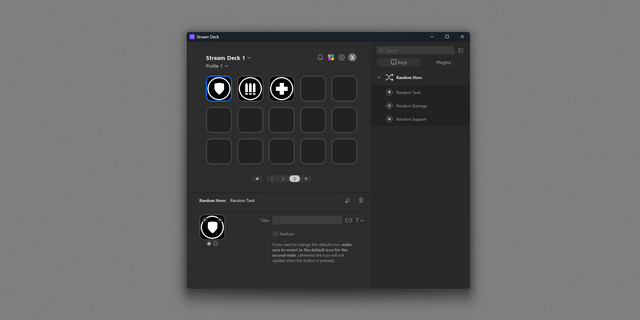
Randomizer
Overview
A suite allowing you to set lists to randomly pick from.
Currently contains two randomizing actions.
Random List
Each line is a possible choice
Each word in a line will be moved to the next line on the Stream Deck button. Use dashes or underscores to prevent this automatic behaviour
The random is WITH replacement as if you picked a random ball in a box, and then put it back meaning you may end up having several time the same choice/ball in a row
Example :
AAA BBB
CCC DDD
When you press, you will end up selecting either (AAA BBB) or (CCC DDD) which will be shown on your button as AAA (first line) BBB (second line), or CCC (first line) DDD (second line)
Random List YAML
This list is more advanced than the Random List but it is also expected that you follow a specific syntax when you declare your list which is called YAML
Spaces are also visual new lines
Do not use the + in your lists as it is a special element (join)
You can choose to randomize without replacement meaning the list will slowly drain until it becomes empty and then resets
You can display the remaining number of elements in the list on top of the selected element
You can add weights to each of your elements to increase the probability of getting that element
You can filter a sub-branch of your YAML dictionary and also join sub-branches
Example :
office-staff:
*- Lawyer*
*- Human resources*
field-staff:
*- Worker*
*- 4::Commercial*
You can add the whole dictionary in the Random YAML List field
Then you can specify a filter in the Filter field. These are valid filter:
Blank -> Random is on all leaves
office-staff -> Your button will random on Lawyer or Human Resources
office-staff+field-staff -> It joins one or more sections
This is especially useful if you are reusing the same dictionary on several actions, as you can just paste your updated YAML dictionary on all the buttons.
If you want to add different weights to different elements, you can either duplicate the element in your list, or more elegantly, activate the checkbox Weighted which then allows you to prefix your element with X:: where X is a strictly positive integer as shown in the example (4::Commercial).
To prevent replacement, tick the box Drain list until empty then reset. If activated, weighted elements will increase the size of the list meaning field-staff will start with 5 elements (4xCommercial + 1xWorker) and thus you will draw 4 times commercial before seeing Worker a second time.
Misc information :
Do not set a title as it will be hiding your rolls
You can override the background with any asset you have to customize the look
Two new actions :
Random List
Allows you to randomly pick an element with replacement
Random List YAML
A more advanced dictionary / list allowing for weight, categories, joins, remaining count, and no replacement
Version 1
May 29, 2026
Details
Type
Development
OS
Mac
Windows
Compatibility
Stream Deck 6.9 or later
Size
414.42 KB
Version
1
Language
English
Support
Profiles
No
Dial support
No
You might also like