Music
Reason Remote
Overview
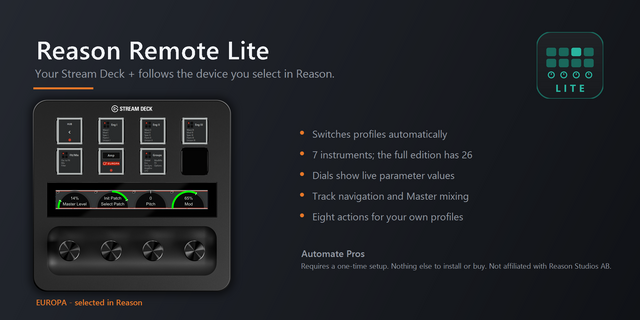
Your Stream Deck + follows the device you select in Reason. Click a Thor and the dials become Thor's oscillators, filters and envelopes. Click a SubTractor and the deck switches again. No profile switching, no button presses.
Stock Reason instruments are covered so far — SubTractor, Thor, Europa, Malstrom, Kong, Redrum, Umpf, Radical Piano, Radical Keys, Humana, Klang, Pangea, the samplers and the Combinator. Each gets pages, groups and dials hand-authored from that device's real remotable parameters, and lands on Volume, Patch, Pitch and Mod. Live values feedback both ways, so moving a control in Reason updates the touch strip too.
Combinators show the rotaries and buttons the patch uses. Name, hide and colour them with a layout, or let the plugin build one from the patch file.
Also included: Document track navigation, Master Section mixing, a piano for auditioning sounds, and eight actions for your own profiles.
REQUIREMENTS: A one-time Reason Remote codec and virtual MIDI port setup, about 20 minutes. Nothing else to install and nothing else to buy — the dials, keys and mixer are all part of this plugin. Guide: github.com/Automate-Pros/reason-remote-setup.
Windows only. Stream Deck + required. Not affiliated with, or endorsed by, Reason Studios AB. Reason and all Reason device names are trademarks of their respective owners.
Combinator support, and every instrument now lands on the same four dials.
Combinator: select one and the deck follows it. All 32 rotaries on the dials, a row per bank, and all 32 buttons on the pads, with a patch page for browsing
The deck only shows the rotaries and buttons the patch actually uses
Custom layouts: press Layout to name the controls, hide the ones you don't use and set colours. Layouts are plain files and survive plugin updates
Layouts can be built for you from the patch file, so user and pack Combinators come up already labelled
Every instrument lands on Volume, Patch, Pitch and Mod where the device has them, with more banks behind each dial. Hold and turn a dial to change bank
On the piano page, press dial 3 to borrow the instrument's dials, so you can play a sound and change the patch or tweak it without leaving the piano
Re-run the setup installer and restart Reason after updating. The codec gained the Combinator and the new Patch dials
Requirements: one-time Reason Remote / loopMIDI setup, Windows 10+, Stream Deck software 6.9+, Stream Deck+ hardware
Version 1.4
Sep 25, 2026
Details
Type
Music
OS
Windows
Compatibility
Stream Deck 6.9 or later
Size
43.6 MB
Version
1.4
Language
English
Support
Neo Infobar support
No
Profiles
Yes
Dial support
Yes
Additional links
You might also like