Business
Rentman Deck
by Packlist One
Overview
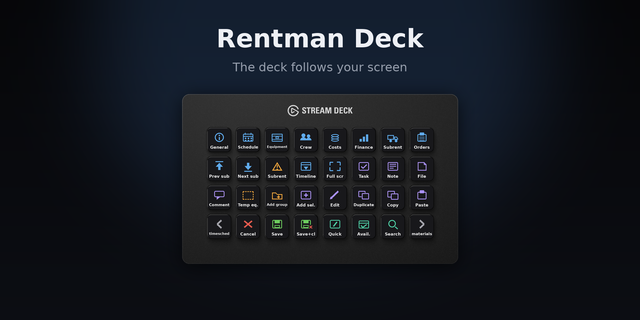
Follows the Rentman screen you are on, dynamically switching the deck to the matching pages shortcuts. Includes a launcher to start chrome and the plugin, along with a key that puts the cursor back in the warehouse code box.
Drag Launch Rentman onto any key on your normal profile, not the Rentman one. Your normal profile is the right home for it, because you press this key before Rentman is open.
In the Streamdeck click the launch key and add your Rentman URL https://youraccount.rentmanapp.com
Press the Launch key. Rentman opens in its own window.
The first time only, you will be asked to sign in. This is a separate browser profile, so it does not share your normal Chrome session. Sign in once and it stays signed in.
Rentman must be opened by this key. A Rentman tab opened in ordinary Chrome cannot be seen by the plugin, and nothing will switch.
Optional extras
Focus code field — put the cursor back in the code box of the warehouse checkout window. Drag it onto a key.
Scroll dates and Zoom dates — for the Stream Deck +. Drag onto the dials. Put Scroll dates on all four dials and the date ruler spans the whole touch strip. Turn to move the dates, press to jump to today, and use the zoom dial to widen or narrow the range.
updates and fixes
Version 4.5
Oct 13, 2026
Details
Type
Business
OS
Mac
Windows
Compatibility
Stream Deck 6.9 or later
Size
3.48 MB
Version
4.5
Language
English
Support
Dial support
No
Neo Infobar support
No
Profiles
Yes
You might also like