Productivity
Retro Terminal Pro
by PackRat 🐀
Overview
Retro Terminal Pro is the ultimate customizable version of the PackRat Retro Terminal for CORSAIR XENEON Edge.
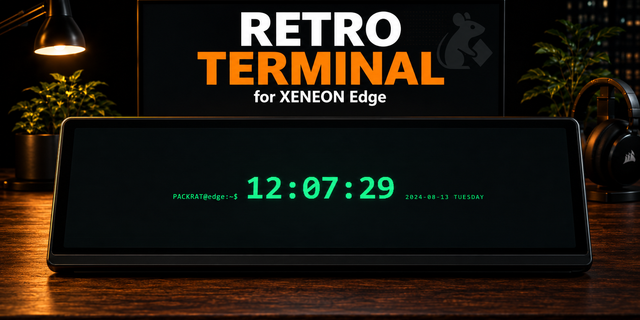
Keep the terminal-first look that made the free version useful as an ambient display, then customize it into the CRT you actually want: green phosphor, amber, white monochrome, blue terminal, cyberpunk, or your own custom colors. Tune scanlines, glow, subtle flicker, vignette and CRT curvature from iCUE.
Choose from multiple startup sequences and five touch-switchable programs: PROMPT, SYSTEM, TRACE, DATA RAIN and CLOCK. PROMPT uses your own machine name, username, command and ambient script lines. TRACE and DATA RAIN are clearly labeled synthetic terminal visuals. CLOCK uses local device time.
SYSTEM is the one live telemetry program. It discovers CPU, GPU and memory sensors exposed by the native iCUE Sensors provider and shows only values iCUE actually returns. Missing sensors stay unavailable instead of being replaced with fake data. The uptime line is the widget session uptime and is labeled that way, not presented as PC uptime.
Enable automatic program rotation, automatic style rotation, or an idle screensaver that moves to Clock, Data Rain or Trace after a configurable period. Any touch wakes the terminal, and the five program keys let you jump between views instantly.
Settings and the last manually selected program are stored locally per widget instance. No PackRat account or external service is required.
Retro Terminal Pro is a separate paid product. The original free Retro Terminal remains unchanged.
Part of the PackRat 🐀 collection for CORSAIR XENEON Edge.
• Six terminal looks: green phosphor, amber, white monochrome, blue terminal, cyberpunk and custom colors.
• Five touch-switchable programs with configurable startup, automatic rotation and idle screensaver behavior.
• Live SYSTEM program uses only CPU, GPU and memory values returned by the native iCUE Sensors provider.
• Custom machine name, username, prompt command and ambient terminal script lines.
• Adjustable scanlines, glow, subtle flicker, vignette and CRT curvature with tuned layouts for all eight XENEON slot compositions.
Version 1
Sep 14, 2026
Details
Type
Productivity
Utilities
Device
XENEON EDGE
OS
Windows
Size
53.68 KB
Version
1
Language
English
Support
Dashboard Sizes
Extra large
Large
Medium
Small
Interactive
Yes
You might also like