Creative Tools
Rhino Shortcut Profile + Icon Pack
by Adx.cool
Overview
The complete Rhino keyboard shortcut pack for Stream Deck.
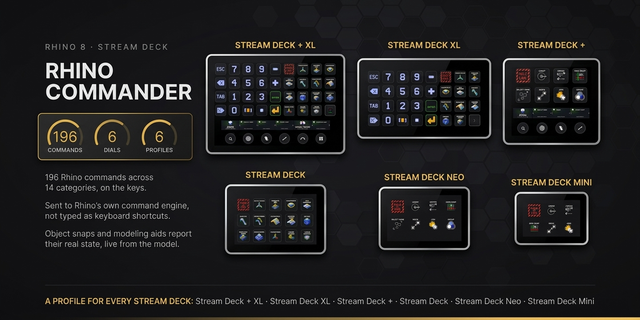
62 shortcuts across 7 categories — organized, scored by importance, and ready to install on Stream Deck Neo, Classic / MK.2, XL. Stop memorizing key combos. One tap, one action.
What's included:
• Edit & Objects (14): Undo, Redo, Cut, Copy to Clipboard, Paste, and 9 more
• View (14): Maximize Viewport, Zoom Window, Zoom Extents, Zoom All Extents, Zoom In, and 9 more
• Viewports & Display (9): Maximize Top Viewport, Maximize Front Viewport, Maximize Right Viewport, Maximize Perspective Viewport, Display Mode: Wireframe, and 4 more
• Modeling Aids (8): Toggle Ortho, Toggle Grid Snap, Show Grid and Axes, Toggle Selection Filter, Control Points On, and 3 more
• Visibility (7): Hide, Show, Show Selected, Lock, Unlock, and 2 more
• File & Panels (7): New, Open, Save, Print, Help, and 2 more
• Help (3): Rhino 8 Documentation, Mouse and Keyboard Shortcuts, McNeel Forum
Features:
• 62 Rhino keys in 6 folders — Edit & Objects (14), View (14), Viewports & Display (9), Modeling Aids (8), Visibility (7), File & Panels (7)
• From McNeel's own default keyboard table, with the Mac side following McNeel's 'Ctrl (CMD)' notation
• Join, Trim, Split, Group, Block — the modelling verbs on their own keys
• Maximise Top, Front, Right or Perspective, and the five display modes: wireframe, shaded, rendered, ghosted, X-ray
• Zoom, extents, orbit steps, view undo/redo and next viewport
• Ortho, grid snap, control points, selection filter and properties on Windows
• Smart Profile pre-bound to Rhino.exe, plus Help keys for the Rhino 8 docs, the shortcut page and the McNeel forum
Install: double-click any .streamDeckProfile to import. The App binding is pre-filled to Rhino — auto-activates on focus. If it didn't pre-fill, set it manually under Stream Deck → Preferences → Profiles → App.
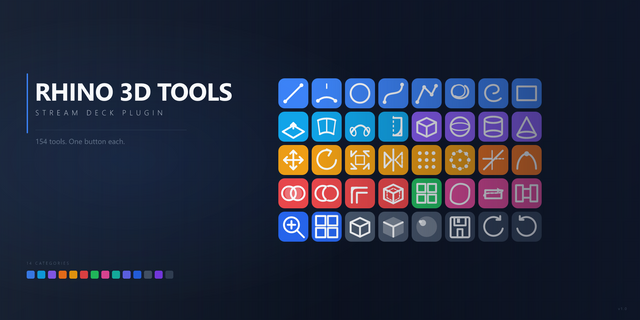
Also included: the 186-icon Rhino icon pack (62 icons in 3 finishes), as a .streamDeckIconPack you can install with a double-click. Every key in this profile, available to drop on any action you like.
Try it first: press the keys of this profile in your browser, no install — https://streamdeck.adx.cool/try/rhino/
Learn more about Rhino: https://www.rhino3d.com/
v1.0 — 2026-09-25 — first release.
READ OFF McNEEL'S OWN DEFAULT KEYBOARD TABLE, with the view keys from the Rhino 8 shortcuts page. The Mac side follows McNeel's 'Ctrl (CMD)' notation — except where a ⌘ key would hit macOS itself.
Inside: • Edit & Objects (14) — undo, redo, cut, copy, paste, select all, join, trim, split, group, ungroup, block, insert, find • View (14) — maximise, zoom window, extents, zoom in/out, orbit, view undo/redo, next viewport, camera • Viewports & Display (9) — maximise Top/Front/Right/Perspective, wireframe, shaded, rendered, ghosted, X-ray • Modeling Aids (8) — ortho, snap, grid, selection filter, control points on/off, CPlane undo/redo • Visibility (7) — hide, show, show selected, lock, unlock, unlock selected, SubD display • File & Panels (7) — new, open, save, print, help, command history, properties • Help (3) — Rhino 8 docs, shortcut page, forum
On macOS four keys and the F-keys are Windows-only, deliberately — see the setup notes.
Version 1
Sep 28, 2026
Details
Type
Creative Tools
Device
Stream Deck MK
Stream Deck Neo
Stream Deck XL
OS
macOS
Windows
Compatibility
Stream Deck 6.4 or later
Size
6.43 MB
Version
1
Language
English
Support
Icons
Yes
Additional links
You might also like