Artistic
RSS Feed Reader
by Corsair
Overview
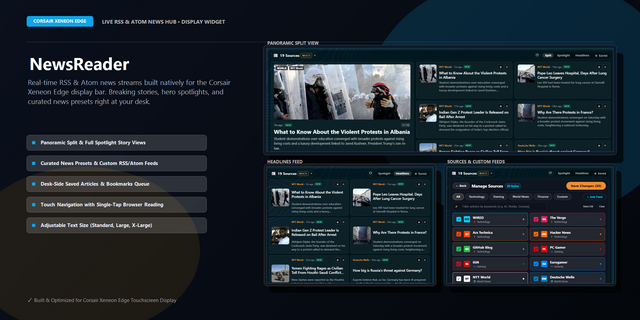
RSS Feed Reader puts a tabbed, multi-source news reader on your iCUE Xeneon Edge LCD. Follow up to five RSS or Atom feeds at once: news, blogs, tech, sports, gaming, or anything else with a feed. It starts with NYT World, CNBC, and WIRED, and you can swap in your own feeds anytime. Tap a headline to open the full story in your browser.
How It Works The widget reads feed links and turns them into a clean, tabbed headline view on your screen. Switch between feeds with the tabs, scan titles and summaries, and tap a story to open the full article in your browser. If a feed includes artwork, the widget shows thumbnails automatically.
Some websites are friendly to apps and load right away. Others may open fine in a browser but still block apps from reading the feed directly. If that happens, the feed URL is not always wrong. The site may simply be restrictive. Feeds that allow Access-Control-Allow-Origin are the most reliable, because they avoid common browser CORS errors inside the widget.
Getting Started Works immediately with the default NYT World, CNBC, and WIRED feeds. To customize, open widget settings and paste in your own RSS or Atom links. If a feed refuses to load, try the site's official feed first. Feeds that expose Access-Control-Allow-Origin tend to work best in the widget.
What's Included
RSS Feed Reader widget (sensor-screen/dashboard LCD)
Support for up to 5 simultaneous RSS/Atom feeds
Tabbed feed navigation
Thumbnail image display
Article headline and description
Tap-to-open-in-browser
Initial release
Version 2.0.4
Apr 27, 2026
Details
Type
Artistic
Business
Productivity
Device
XENEON EDGE
OS
Windows
Size
22.95 KB
Version
2.0.4
Language
Chinese (Simplified)
Chinese (Traditional)
English
French
German
Italian
Japanese
Korean
Russian
Spanish
Ukrainian
Support
Dashboard Sizes
Extra large
Large
Medium
Small
Recommended Orientation
Horizontal
Vertical
Interactive
Yes
You might also like