Business
Shapr3D macOS Studio Deck
Overview
Near total control of Shapr3D from your Stream Deck. Sketch, model, orbit and type exact dimensions: 84 Shapr3D commands on keys that light as you work, plus a numpad, a category hub and seven dials, the first six live on every page of the Stream Deck + XL. Six bundled profiles, Stream Deck Mini to Stream Deck + XL. Built for Shapr3D 26.143 on macOS 13 or later.
SETUP ON A MAC
Click OK when macOS asks to let Elgato Stream Deck control System Events. Accessibility has no prompt: add Elgato Stream Deck under System Settings, Privacy & Security, Accessibility, then quit and reopen the Stream Deck app. Keys and dials send their Mac chords only while Shapr3D is the front window; nothing steals focus.
EASY LINK, BUILT IN
Hold the Easy Link key about a second while Shapr3D is in front: the deck binds it to this plugin's profile, switches in whenever Shapr3D takes focus, and hands back when you leave.
SEVEN DIALS
- View: turn through Front, Right, Back and Left, press for Default View, tap for Top or Bottom.
- Undo / Redo: clockwise redoes, counter-clockwise undoes, taps step one at a time, press sends Escape.
- Tool Ring: turn to arm any of 17 sketch and modeling tools on the touch screen, press to fire it, tap to swap sets. Nothing sends until you press.
- Horizontal Orbit: a smooth two-finger-trackpad-style orbit; press flips the turn's axis, hold down for fine steps, tap for Rotate Up or Down.
- Panels: press for the Items sidebar, tap left for Drawings, right for the Properties and History drawer; the turn is retired and sends nothing.
- Constraint Ring: ten sketch constraints, same grammar: turn to arm, press to apply. Taps send Escape and Finish Sketch.
- Vertical Orbit: the same orbit, vertical first; press flips the axis, taps go Top or Bottom.
The Stream Deck + carries View, Undo, Tool Ring and Horizontal Orbit on page one, then Panels, Constraint Ring and both orbit dials on page two.
A NUMPAD UP FRONT
The Stream Deck + XL profile opens on a full numpad: digits, 00, decimal, Enter, Backspace, Undo and Redo, with operators, parentheses, half and double keys and Lights Off one page over. It types into whatever numeric field Shapr3D already has open.
KEYS THAT LIGHT
Launch a tool from the deck and its key lights in the plugin accent; pick another and the previous one blinks out. Toggle commands latch lit until you turn them off. A lit key means you launched it from this deck: pick a tool with the mouse and the deck cannot see it. While Shapr3D is in front, Undo and Redo dim when there is nothing to undo or redo. Lights Off clears the board.
WHAT'S INCLUDED
- 12 remappable category actions covering 84 commands: Sketch Tools, Sketch Constraints, Modeling, Booleans, View, Selection, Edit & History, Panels & Documents, Display Modes, Items, Rotate View, and Project & Files.
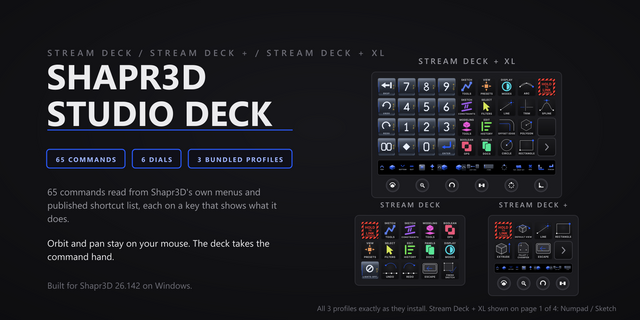
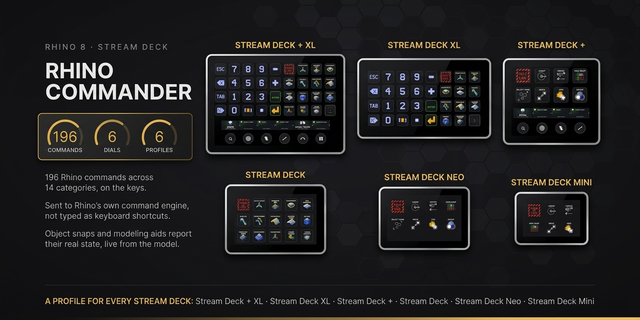
- Six bundled profiles, Easy Link on each: a 14-page hub profile for the 15-key Stream Deck, a two-page Stream Deck + profile with 13 starter commands and four dials per page, the five-page Stream Deck + XL profile with the numpad up front, every command and six dials on every page, a three-page Stream Deck XL profile with all 84 commands laid flat, and a seven-key starter on the two-page Stream Deck Mini profile and the one-page Stream Deck Neo profile.
- Factory-default macOS chords; any key can be re-pointed from the property inspector.
- Per-key sounds: 40 in the box plus three Easy Link cues. Drop your own WAV files into Documents/Pathfinder Sounds and they appear in the Key Sound picker.
- Purpose-drawn key faces for all 84 commands and 34 numpad keys.
First release of the macOS edition. Near total control of Shapr3D from your Stream Deck: 84 Shapr3D commands across 12 remappable categories, on keys that light as you work. Keys send their Mac chord only while Shapr3D is the front window. Six bundled profiles, Easy Link on each: Stream Deck, Stream Deck +, Stream Deck + XL, Stream Deck XL, Stream Deck Mini and Stream Deck Neo.
Seven dials, six seated on every page of the Stream Deck + XL: View presets, an Undo and Redo scrub that follows Shapr3D's Edit menu, a Tool Ring that arms any of 17 sketch and modeling tools on the touch screen and fires on the press, an orbit dial that swings the camera like a two-finger trackpad swipe, its press flipping the axis (horizontal first), a Panels dial for the Items and Drawings sidebars and the Properties and History drawer, and a Constraint Ring for ten sketch constraints. The Stream Deck + adds a second orbit dial on page two, vertical first.
A numpad leads the Stream Deck + XL profile: digits, 00, decimal, Enter, Backspace, Undo and Redo, with operators, parentheses, half and double keys and Lights Off one page over. It types into whatever numeric field Shapr3D already has open.
Tool keys light in the plugin accent when launched from the deck, the previous one blinks out, and Lights Off clears the board. Undo and Redo dim when Shapr3D has nothing to undo or redo.
Per-key sounds: 40 in the box plus three Easy Link cues.
Built for Shapr3D 26.143 on macOS 13 or later.
Version 1
Aug 21, 2026
Details
Type
Business
Development
Productivity
OS
Mac
Compatibility
Stream Deck 6.9 or later
Size
10.15 MB
Version
1
Language
English
Support
Profiles
Yes
Dial support
Yes
Additional links
You might also like