Creative Tools
Shapr3D Shortcut Profile
by Adx.cool
Overview
Stream Deck + ready — dial-aware Shapr3D shortcut pack with custom touchstrip layouts.
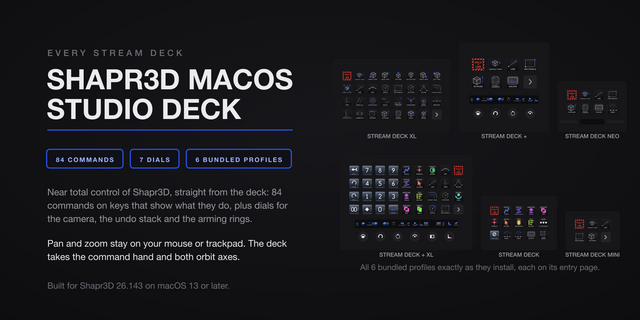
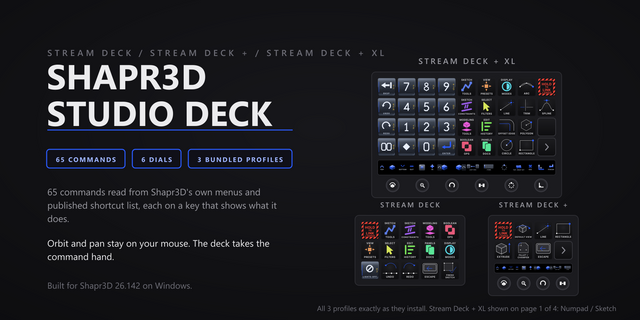
73 shortcuts across 11 categories — organized, scored by importance, and ready to install on Stream Deck Classic / MK.2, XL, +XL. Stop memorizing key combos. One tap, one action.
Dial features (Stream Deck +XL): • 4 dedicated dial layouts on the touchstrip • Rotate to adjust values (with optional acceleration on rapid spin) • Press, long-press, and touch tap each bind to distinct actions • Falls back gracefully to keypad-only on Stream Deck Classic / MK.2, XL
What's included:
• Dashboard (14): New Project, Import, Import as New, New Folder, Folder from Selection, and 9 more • Constraints (10): Parallel, Concentric, Equal, Horizontal / Vertical, Coincident, and 5 more • Modeling (9): Extrude, Fillet & Chamfer, Shell, Move & Rotate, Translate, and 4 more • Sketch (8): Line, Rectangle, Circle, Arc, Polygon, and 3 more • Panels (8): Project Sidebar, Items Panel, History Panel, Collapse All, Last Document, and 3 more • Views (7): Reset View, Front View, Back View, Top View, Bottom View, and 2 more • Selection (6): Select All, Select Through, Cycle Filters, Bodies Only, Edges Only, and 1 more • Edit (4): Undo, Redo, Delete, Finish Sketch • Boolean (3): Union, Subtract, Intersect • Utilities (3): Update 2D Drawing, Create Variable, Screenshot • Help (1): Open Docs
Features: • 73 shortcuts across 10 folders — sketch, constraints, modeling, boolean, views, selection, edit, panels, dashboard, utilities • 27 single-key tool hotkeys: the full sketch, constraint and modeling grid • Four dials with a photoreal skeuomorphic LCD — undo/redo, selection-filter cycle, project history, panel toggles • All seven standard views on their own keys, drawn as one isometric family • Smart Profile auto-switch on macOS and Windows • Every binding traced to Shapr3D's own published shortcut table, not transcribed from memory
Install: double-click any .streamDeckProfile to import. The App binding is pre-filled to Shapr3D — auto-activates on focus. If it didn't pre-fill, set it manually under Stream Deck → Preferences → Profiles → App.
Learn more about Shapr3D: https://www.shapr3d.com
Setup (required for some keys)
The 27 single-key tool hotkeys (Sketch, Constraints and Modeling) need Settings > Single Key Action set to Hotkeys. Shapr3D enables this by default on new installations, but the vendor notes that an older install may still default to Command Search, in which case these keys open a search box instead of picking the tool.
E, F and B are reused by Shapr3D itself: in the modeling space they are Extrude, Fillet and Shell; with a selection active they filter to edges, faces and bodies. Both senses ship, in the Modeling and Selection folders, because the Stream Deck sends the keystroke and Shapr3D decides which one applies.
The Dashboard folder is macOS only. Shapr3D publishes that section of its documentation in Command-key notation with no Windows column, so no Windows binding is asserted for it.
v1.0 — 2026-08-27. Initial release.
73 shortcuts across 10 folders: sketch tools, sketch constraints, modeling, boolean operations, the seven standard views, selection filters, editing, panels, the project dashboard and utilities. Every binding is traced to the shortcut table Shapr3D publishes itself rather than transcribed by hand.
Three dials ship alongside, on a companion plugin drawing a photoreal skeuomorphic LCD: Undo and Redo on one rotation, a selection-filter cycle walking bodies, edges and faces, and the Items and History panels with the Project Sidebar on press.
Native features: Smart Profile auto-switch on macOS and Windows, a Help folder linking the vendor shortcut reference, and folder navigation with three pinned keys.
The Dashboard folder is macOS only — Shapr3D publishes that section with no Windows column, so no Windows binding is asserted.
Version 1
Sep 4, 2026
Details
Type
Creative Tools
Device
Stream Deck +
Stream Deck MK
Stream Deck XL
Stream Deck + XL
OS
macOS
Windows
Compatibility
Stream Deck 6.4 or later
Size
6.99 MB
Version
1
Language
English
Support
Dial support
Yes
Icons
Yes
Additional links
You might also like