Business
Shapr3D Studio Deck
Overview
1.0.0.0
---
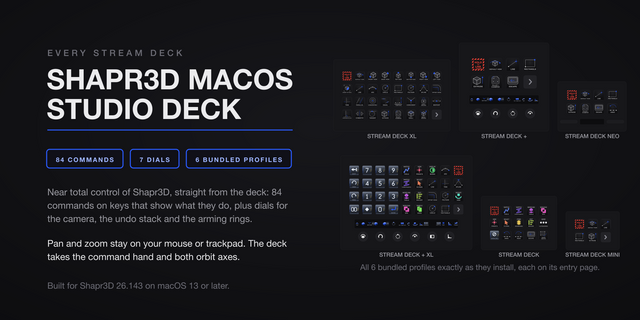
Six dials on the Stream Deck + XL: every encoder the device has, seated on every page of its profile. View presets, zoom at the pointer, an undo and redo scrub, a history walker, a Tool Ring that arms any of 17 sketch and modeling tools on the touch screen and fires on the press, and a Constraint Ring doing the same for ten sketch constraints. The Stream Deck + splits them across two pages: View, Zoom, Undo and History, then both rings with Zoom and Undo.
A numpad leads the Stream Deck + XL profile: digits, 00, decimal, Enter, Backspace, undo and redo, with operators, parentheses and half and double keys one page over. It types into whatever numeric field Shapr3D already has open. Nine category keys sit beside the numpad and jump straight to their pages, with Home, Undo, Redo, Escape and Finish Sketch on each page they jump to.
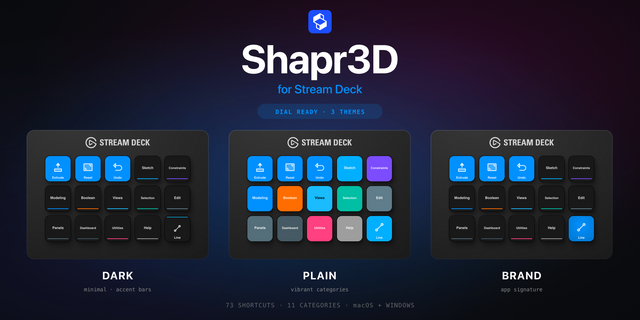
65 commands across 9 remappable categories, each on a purpose-drawn key face. Tool keys light in the plugin accent when launched from the deck, the previous one blinks out, and a Lights Off key clears the board. Undo and Redo dim whenever Shapr3D itself disables them, numpad keys included.
Easy Link ships built in on all three bundled profiles: hold it about a second while Shapr3D is in front and the deck follows the app from then on.
Per-key sounds: 40 in the box plus three Easy Link cues, and recordings from our free Sound Sampler plugin appear in the Key Sound picker.
Built for Shapr3D 26.142 on Windows 10 and 11.
1.0.0.0
---
Six dials on the Stream Deck + XL: every encoder the device has, seated on every page of its profile. View presets, zoom at the pointer, an undo and redo scrub, a history walker, a Tool Ring that arms any of 17 sketch and modeling tools on the touch screen and fires on the press, and a Constraint Ring doing the same for ten sketch constraints. The Stream Deck + splits them across two pages: View, Zoom, Undo and History, then both rings with Zoom and Undo.
A numpad leads the Stream Deck + XL profile: digits, 00, decimal, Enter, Backspace, undo and redo, with operators, parentheses and half and double keys one page over. It types into whatever numeric field Shapr3D already has open. Nine category keys sit beside the numpad and jump straight to their pages, with Home, Undo, Redo, Escape and Finish Sketch on each page they jump to.
65 commands across 9 remappable categories, each on a purpose-drawn key face. Tool keys light in the plugin accent when launched from the deck, the previous one blinks out, and a Lights Off key clears the board. Undo and Redo dim whenever Shapr3D itself disables them, numpad keys included.
Easy Link ships built in on all three bundled profiles: hold it about a second while Shapr3D is in front and the deck follows the app from then on.
Per-key sounds: 40 in the box plus three Easy Link cues, and recordings from our free Sound Sampler plugin appear in the Key Sound picker.
Built for Shapr3D 26.142 on Windows 10 and 11.
Version 1
Aug 11, 2026
Details
Type
Business
Development
Productivity
OS
Windows
Compatibility
Stream Deck 6.9 or later
Size
8.91 MB
Version
1
Language
English
Support
Profiles
Yes
Dial support
Yes
You might also like