Monitoring
Sidekick for OBS
Overview
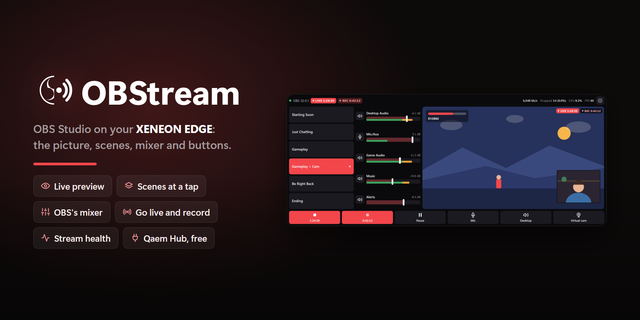
Bring OBS controls to your fingertips with Sidekick for OBS, an interactive XENEON EDGE widget. Keep your scenes, audio, streams, and recordings within reach while you create or game.
What’s Included
Switch scenes, show or hide sources, and trigger scene transitions. Use Studio Mode to prepare your next scene before sending it to Program.
Adjust audio levels, mute individual sources, and toggle audio monitoring. Read live level meters with clear mute and monitoring indicators.
Start or stop streaming, recording, and your virtual camera. Pause and resume supported recordings, and check stream and recording timers, CPU usage, and FPS.
Customization
Choose Program, Preview, or Both to monitor your scenes. Both automatically arranges the two views to fit the available space.
Sidekick adapts to Small, Medium, Large, and XL widget sizes. Larger layouts keep scenes and controls accessible alongside your video; compact layouts organize tools into tabs.
Navigate with touch, mouse wheel, draggable scrollbars, or middle-button panning.
Setup and Connectivity
Import the widget into iCUE. In OBS, open Tools > WebSocket Server Settings and enable the server. Enter the address, port, and password in Sidekick, then select Connect.
Approve access in iCUE when prompted. Sidekick retries while you complete approval and remembers successful connection details locally for automatic reconnection.
Connects directly to OBS. Respawn Companion is not required.
Disclaimer
Sidekick for OBS is independently developed by Respawn Icons and is not endorsed by, sponsored by, or affiliated with the OBS Project or Corsair.
Features and compatibility may change with OBS or iCUE updates. All trademarks, logos, and related intellectual property belong to their respective owners.
Version 1.2 - Minor Update
- Changed max FPS to 60 (May be more demanding on your hardware)
Version 1.2
Oct 13, 2026
Details
Type
Monitoring
Productivity
Streaming
Utilities
Video
Device
XENEON EDGE
OS
Windows
Size
114.04 KB
Version
1.2
Language
Chinese (Simplified)
English
French
German
Italian
Japanese
Korean
Russian
Spanish
Support
Dashboard Sizes
Extra large
Large
Medium
Small
Recommended Orientation
Horizontal
Vertical
Interactive
Yes
You might also like