Monitoring
Signals Lite
Overview
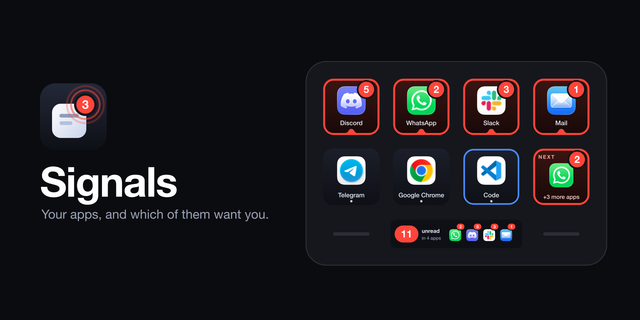
Signals Lite is the free edition of Signals. It puts four of your apps on your Stream Deck and shows which of them want you. Each key is an app, with its real icon and the same unread count its Dock icon shows.
ONE KEY, ONE APP — Pick any installed app. The key shows its icon, a dot while it is running, a blue ring while it is in front, and its Dock badge the moment it has one. Tap to open the app or switch to it.
WANTS YOU, OR SEEN — An app wants you from when its badge appears or its count goes up. Hold the key and it is marked seen: the count stays, the red ring goes, and it stays quiet until something new arrives.
UNREAD — Everything unread across all your apps, added up, and in how many apps. Tap it to mark everything seen at once.
ANY APP WITH A BADGE — Mail, Slack, Discord, Telegram, Teams and most others: if it puts a number, a dot or a word on its Dock icon, Signals shows it, with no permission.
WHATSAPP, MESSAGES AND A FEW OTHERS — Some apps tell only the Dock about their badge. To show those too, allow Accessibility for Stream Deck once, from the plugin's settings. It is optional.
NEW: YOUR NEWEST NOTIFICATION — On a Stream Deck Neo, the Infobar shows your newest macOS notification of the last five minutes, with its app's icon, title and message.
NOTHING LEAVES YOUR MAC — The keys read only the badge anyone can see on your Dock and need no permission. The notification is optional: macOS keeps notifications where only apps with Full Disk Access may look, so it needs that for Stream Deck, once. Read on this Mac, read-only, never sent anywhere. No login, no account, no network.
THE FULL SIGNALS ADDS — As many apps as you have keys, the Next key that takes you to whoever has waited longest, the App Tray: keys that fill themselves with your running apps, every recent notification in turn, filtered by app and time, and Banners that slide new notifications in over its Infobar.
GOOD TO KNOW — Signals shows what the Dock shows. An app with no Dock badge, or with badges turned off in System Settings > Notifications, has nothing to show. Without Accessibility, WhatsApp, Messages and apps built like them show no count.
macOS 12 or newer, with the Stream Deck app 7.6 or newer. The Infobar and Notifications need a Stream Deck Neo.
Signals Lite 1.2.0
Your newest notification on the Stream Deck Neo's Infobar
New action, Notifications: your newest macOS notification of the last five minutes on the Infobar, with its app's icon, title and message.
Notifications need Full Disk Access for Stream Deck: the settings show whether it is there and open the right page in System Settings. They are read on this Mac, read-only, and never sent anywhere. Your keys need no permission, as before.
The full Signals goes through every recent notification, filters them by app and time, and has Banners: new notifications sliding in over its Infobar.
Also in this update:
Works with macOS 27, and names on your terms
macOS 27 answers in a new format: Signals reads it again, so apps and their badges show as before.
Hidden apps (Cmd-H) count as running: they keep their Dock icon and badge, and now their key too.
New: hide the app names under the icons, for all keys at once ("App names" in the settings). The icon grows into the room; badges, rings and the running dot stay.
An App key can decide for itself: always a name, no name, or a shorter name of your own.
Long names are set a little smaller before they are shortened, so "Microsoft Teams" fits whole.
Still works on macOS 12 to 26. Your keys and settings stay as they are; names show as before until you change it.
Version 1.2
Oct 27, 2026
Details
Type
Monitoring
Productivity
Utilities
OS
Mac
Compatibility
Stream Deck 7.6 or later
Size
225.02 KB
Version
1.2
Language
English
Support
Profiles
No
Dial support
No
Neo Infobar support
Yes
You might also like