Productivity
Slide Deck Two — MK.2 (Mac)
by panda studio
Overview
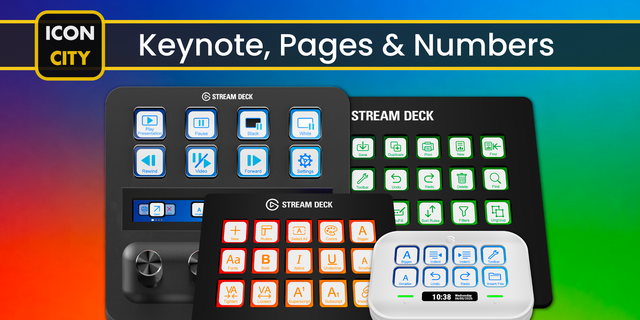
A Stream Deck MK.2 profile for Keynote on Mac: 41 built-in Keynote shortcuts on a Home page and 2 folders. Play, add and skip slides, and arrange objects with one press.
HOME
• Play slideshow, new slide, duplicate, skip slide
• Undo, redo, save, presenter notes
• Inspector, fit slide in window, bold, new comment, go to slide + folders Slides, Arrange
SLIDES
• Edit slide layouts, object list, rulers, toolbar
• Actual size, zoom to selection, next / previous comment
• Colors and Fonts windows, chart data editor, equation, draw with the pen, add link
ARRANGE
• Group, ungroup, lock, unlock
• Bring to front, forward, backward, send to back
• Copy / paste style, paste and match style, edit mask, merge table cells, deselect all
DETAILS
• Keynote default shortcuts, checked against Apple's Keynote shortcut list and the menus of Keynote 14.4
• Only letter and number keys are used, so the profile does not depend on your keyboard's symbol layout
• macOS only (Mac key codes). An icon on every key. Built and exported in the Stream Deck app. No plugins needed
• For PowerPoint, see Slide Deck One
Keynote and Mac are trademarks of Apple Inc., registered in the U.S. and other countries and regions. panda studio is not affiliated with or endorsed by Apple Inc.
First release: 41 Keynote for Mac shortcuts for Stream Deck MK.2 on Mac in a Home page and 2 folders (Slides, Arrange).
Version 1
Oct 5, 2026
Details
Type
Productivity
Device
Stream Deck MK
OS
macOS
Compatibility
Stream Deck 7.1 or later
Size
340.02 KB
Version
1
Support
Icons
Yes
AI Content
Yes
You might also like
-thumbnail-optimized-a8bf1a6a-218f-4518-860d-5a6329c80aa4.png)
-thumbnail-optimized-73da3f0d-2953-4ce6-88d4-b6f45f7e9626.png)
-thumbnail-optimized-1b1acbeb-c866-4313-89ee-cb9be8a0881f.png)