Utilities
Smart Remote+ for Apple TV
Overview
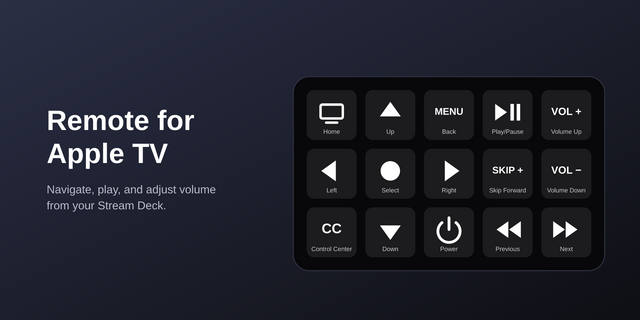
Control your Apple TV from your Stream Deck, with keys and, on Stream Deck +, dials. Smart Remote+ talks directly to Apple TV over your own network, the same way the Siri Remote and Control Centre remote do. Nothing goes through the cloud, no account is needed, and pairing takes a four-digit code.
Dials for Stream Deck +
- Playback Dial: turn to jump back or forward through what's playing, 10, 15, 20, 30 or 60 seconds a click. Press to play or pause. The touchscreen shows whether it's playing or paused.
- Navigation Dial: scroll through menus up and down, or left and right. Press to select, tap the touchscreen for Back, hold it for TV / Home.
- App Dial: turn through the apps on your Apple TV, each with its artwork, and press to open one.
- Volume Dial: turn for volume, press to mute, with the level on the touchscreen when your audio setup reports it.
Keys that know what your Apple TV is doing
- Play / Pause shows pause while something is playing, even when you use the Siri Remote.
- Mute and Captions show whether they're on.
- Hold Volume Up or Down to keep changing the volume, just like a remote.
- One matching set of key art, sized to fill every key, and Launch App keys wear each app's own artwork.
Everything you can put on a key
- Power: a toggle that checks whether your Apple TV is asleep first, plus separate Power On and Power Off
- Volume up, down and mute
- Launch App: open Netflix, Disney+, Apple TV, YouTube or anything else installed, or a launch URL
- Play / Pause Toggle, plus separate Play and Pause
- Skip Back and Skip Forward, Previous Track and Next Track
- Captions: turn captions on, or back to your usual setting, in apps that use the Apple TV's own subtitles, like the Apple TV app
- Up, Down, Left, Right, OK, Back and TV / Home (hold for Control Centre), Channel Up and Down, and Screensaver
Set up once, use everywhere. Press Scan in any key's settings, choose your Apple TV, then press Pair and enter the four-digit code shown on your TV. Pair once and every key and dial can use that Apple TV, or pick a different one for individual keys.
Works with Apple TV HD and Apple TV 4K on the same network as your computer, on macOS and Windows with Stream Deck 6.9 or later. Dials need a Stream Deck +. Volume keys use HDMI-CEC, so they depend on your TV or receiver; mute and the volume level need an audio route that reports it. Some apps choose their own skip length (Netflix always jumps 10 seconds) or handle subtitles themselves.
Made by Bouncing Ball, the studio behind the Smart Remote+ apps for iPhone, Android and Windows.
See what's playing on your Apple TV.
- Playback Dial (Stream Deck +): the touchscreen now shows the title, artwork, time remaining and a progress bar.
- New Now Playing key: the artwork and title on a key. Press to play or pause.
- New Now Playing Infobar for Stream Deck Neo: the title, artwork, time remaining and a progress bar on the Infobar.
- These details come from the app. The Apple TV app sends them. Some apps, like Netflix, only say whether they are playing or paused, and that is shown instead.
- The details appear after the next play or pause, because the Apple TV only sends them when playback changes.
- Each action's settings let you choose what to show.
This version needs Stream Deck 7.6 or later.
Existing keys, dials and pairings are preserved.
Version 1.3
Oct 7, 2026
Details
Type
Utilities
OS
Mac
Windows
Compatibility
Stream Deck 7.6 or later
Size
4.36 MB
Version
1.3
Language
English
Support
Profiles
No
Dial support
Yes
Neo Infobar support
Yes
You might also like