Artistic
SOLIDWORKS Hotkeys
Overview
Hold the Easy Link key while SOLIDWORKS is in front and the link is made: the deck follows the app you are in. SOLIDWORKS Hotkeys puts 93 SOLIDWORKS commands on labeled keys across 10 categories, adds eight dials for zoom, undo and redo, standard views, roll, orbit, display style, and the feature tree, and shows what SOLIDWORKS is doing on live strips and a status key. Six profiles ship: 15-key Stream Deck, Stream Deck +, Stream Deck + XL, 32-key Stream Deck XL, Stream Deck Mini, and Stream Deck Neo.
EASY LINK, BUILT IN
Hold the key about a second while SOLIDWORKS is in front and the deck binds it to this plugin's profile. The profile switches in whenever SOLIDWORKS takes focus and hands back when you leave.
DIALS AND LIVE STRIPS
Eight dials cover the moves you make constantly:
- Zoom: turn to zoom around the model center, tap to step, press to fit.
- Undo / Redo: clockwise to redo, counter-clockwise to undo, press to force rebuild.
- Standard View: step through the seven standard views, press for Isometric.
- View Roll: roll the view in fine steps, tap the arrows for a bigger step.
- Orbit Up / Down and Left / Right: orbit in fine steps, tap for a bigger step. Long-press saves your view, press snaps back to it.
- Display Style: cycle the five display styles. The strip names what SOLIDWORKS reports, press for Shaded With Edges.
- Feature Tree: walk the tree. The strip names the selected feature, press to clear.
All eight route through the SOLIDWORKS API: no window focus, no keystroke landed. Roll and orbit beat the keyboard: arrow keys move one fixed increment, the dials pick their own angle. The Stream Deck + profile seats four dials; the Stream Deck + XL seats all six encoders on every page. Display Style and Feature Tree drop on any encoder slot. Live strips: document name with an unsaved marker, last landed view.
A NUMPAD ON THE HUB
The Stream Deck + XL and Stream Deck XL profiles open on an extended hub: category keys in a bottom-left panel plus a full numpad. Type a dimension the moment SOLIDWORKS asks: digits, decimal, sign, equals to start an equation, Tab, and a double-tall Enter.
WHAT MAKES IT DIFFERENT
Most hotkey plugins fire a keystroke and hope. This one talks to SOLIDWORKS through its automation API wherever it can; everything else sends the real keyboard shortcut to the active window.
LIVE STATUS ON A KEY
The SOLIDWORKS Status key shows the document name, a SKETCH badge in sketch edit, and a SAVED/UNSAVED indicator, or selection-count mode. The Save key dims when there is nothing to save. Auto page-switch jumps the deck to Sketch & Select in sketch edit and back to the hub after.
PER-KEY SOUNDS
Every key can play a press sound, 33 in the box including the three Easy Link cues. Pairs with our free Sound Sampler: sounds you record appear in the Key Sound picker.
WHAT'S INCLUDED
- Easy Link on a key in every bundled profile.
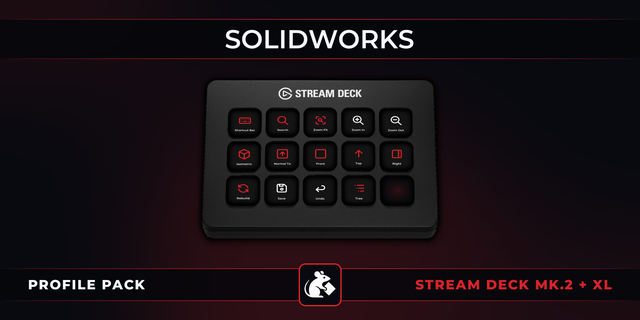
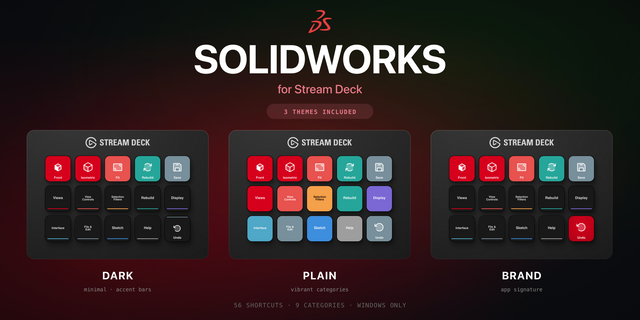
- 10 remappable category actions covering 93 commands: File & Edit, View Orientation, View Navigation, Zoom & Magnify, Rebuild & Redraw, Sketch & Select, Tree & UI, Hide & Show (hover), Appearance, and Tools & Search.
- Six bundled profiles: 11-page hub profiles for the 15-key Stream Deck, the 32-key Stream Deck XL, and the Stream Deck + XL (six dials and live strips), every command pre-placed and Home on every page; a Stream Deck + profile with Easy Link, seven starter keys, and four dials; and Stream Deck Mini and Stream Deck Neo starters.
- Hold-mode hover keys (Hide/Show Hovered Face, Show All Hidden Faces): hold to hold Alt over a face, release to lift.
- Custom hotkey remapping on every key, and 93 purpose-drawn key faces in one SOLIDWORKS-red style that double as the command picker.
NOTES
Hover commands act on whatever the mouse is over. API-routed commands need SOLIDWORKS running with a document open; the key alerts otherwise. Windows only. Verified against SOLIDWORKS Design Professional for Makers 2026; standard editions share the same default keymap.
SOLIDWORKS Hotkeys 2.3.1.0: easier key setup plus Easy Link and reliability fixes.
Pick by face: a command key's settings now show the command list as a grid of the key art, so you choose by what the key will show.
Fixed: a custom hotkey captured with an arrow key never fired. Capture now stores arrow keys in a form the plugin can send; capture any such hotkey set before this update again.
Easy Link: the linked key now shows the app's icon above its name when one can be read, and its settings show each link's face. A failed link plays a shorter chime. Easy Link is now a key action only and can no longer sit on a dial; if you put it on one, move it to a key. The bundled profiles always had it on a key.
Easy Link on more than one deck: the Stream Deck app installs one new profile at a time, so linking several decks at once could leave all but one on its old profile. Each extra deck now comes up about 12 seconds after the one before, only the first time it gets the profile.
Fixed: a key pressed while the keystroke helper restarted after a slow start could fail with the alert mark. A refused profile switch from Open Category or Back no longer stops the plugin. Helper processes now start in your temp folder, so they cannot hold the plugin's folder open during an update. The Open Category settings now point to Home instead of a Back key.
Works with SOLIDWORKS Design Professional for Makers 2026. Windows only.
Version 2.3.1
Oct 13, 2026
Details
Type
Artistic
Business
Development
Productivity
OS
Windows
Compatibility
Stream Deck 6.9 or later
Size
2.82 MB
Version
2.3.1
Language
English
Support
Neo Infobar support
No
Dial support
Yes
Profiles
Yes
Additional links
You might also like