Gaming
Stardew Dashboard
by TeaTime
Overview
Stardew Dashboard puts your farm on the CORSAIR XENEON EDGE: the clock, weather and gold at a glance, and a page for everything else, live while you play Stardew Valley.
The dashboard
The HUD clock: the day and date, today's weather and the season beside a sundial that sweeps across the day, the time, and your gold in a purse of digits
Energy and health, the tool in your hands with its upgrade, the watering can's water and your toolbar slot
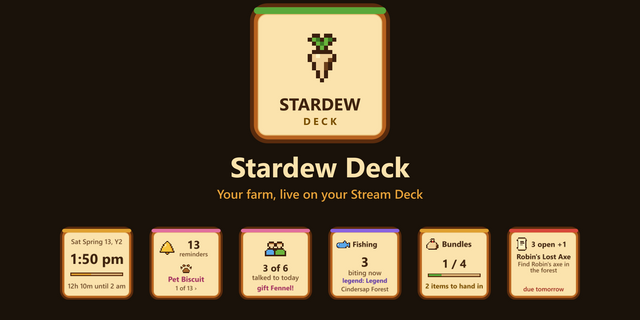
Reminders, most pressing first: pets and animals to pet, crops to water or harvest, machines ready, a birthday gift, a festival, the traveling cart, mail, a quest due, your to-dos, bedtime
Today and tomorrow (festivals with their hours, birthdays with whether you gave a gift, heart events, the cart) and what comes next
The pages
Day: the clock, today's and tomorrow's weather, daily luck, the day so far (gold earned, the shipping bin at tonight's prices), the farm's crops, machines and animals, buffs with the time left, and this week
Farmer: energy, health, gold, the tool, your skills with the experience to the next level, buffs, and who is online in multiplayer
Mines: the floor in the Mines, Skull Cavern or the volcano, monsters and rocks left, the ladder, the elevator, and the ores on the floor when the mod's setting allows it
Fishing: what bites where you stand right now, the fish you have never caught here, and why the others are not biting (another season, rain only, the hours)
Friends: hearts, dating and married, talked to today, gifts this week, birthdays and heart events
Tasks: reminders, quests and special orders with days left, your to-do list and the mailbox
Collections: Community Center bundles with what you carry for them, the shipping collection, museum donations and the traveling cart's stock
Calendar: four weeks from today with every festival, birthday, cart day and cooking show
On the Edge
Choose any size in iCUE, across or upright. Show the whole dashboard with page tabs, or one page per widget, and place several.
Touch: tap a tab to turn the page; tap a long list to see its next rows.
It follows the game: step onto a mine floor and the screen turns to the Mines page; cast a line and it turns to Fishing; it turns back when you are done.
A 12- or 24-hour clock, and your own text, accent and background colours.
It says what is missing instead of going blank.
What you need
Stardew Valley 1.6 on Windows with SMAPI 4, and the Stardew Deck Bridge mod, version 1.2.1 or later (from teatimeservers.ca/plugins/stardew-deck), Stardew Deck's companion mod; no Stream Deck needed.
iCUE 5.51 or later and a CORSAIR XENEON EDGE.
Start the game once with the mod before you place the widget. If you placed it first, add it again or restart iCUE.
Stardew Dashboard is an unofficial project, not affiliated with or endorsed by ConcernedApe. Stardew Valley is a trademark of ConcernedApe.
Stardew Dashboard 1.1.0
Tap controls. A new Controls page with big wooden keys: open the inventory, map, journal, crafting and the other menus, close a menu, pick toolbar slots 1 to 12, zoom, hide the HUD, open the to-do list, mute the music or take a screenshot.
Tap a slot on the dashboard's toolbar to pick it in the game.
Each key shows it was pressed, then whether it worked, and why not.
Cheat keys appear only while cheats are on in the mod.
New setting: Show controls (on by default). Show can also be set to the Controls page alone.
The controls need Stardew Deck Bridge 1.3.0 and a one-time permission in iCUE to talk to the mod on this PC. The widget says plainly when the mod needs updating or its controls are off; the dashboard keeps working from the mod's file either way.
Version 1.1
Oct 13, 2026
Details
Type
Gaming
Device
XENEON EDGE
OS
Windows
Size
167.43 KB
Version
1.1
Language
English
Support
Dashboard Sizes
Extra large
Large
Medium
Small
Recommended Orientation
Horizontal
Vertical
Interactive
Yes
Additional links
You might also like