Audio
SteelSeries GG Sonar Controls
by HarleyCodes
Overview
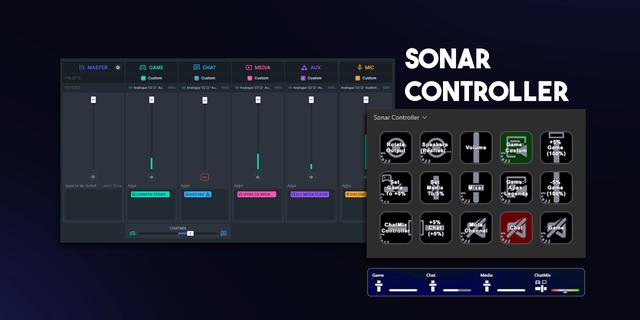
Control SteelSeries GG Sonar right from your Stream Deck. Control the volume of all Sonar channels, along with the CHATMIX mixer. Giving you direct access to the Master channel in Sonar—something Windows or other System based plugins can’t adjust on its own. Pick between a clean white look or a Sonar-matched color variant, and tweak the polling rate to hit the perfect balance of performance and responsiveness.
Current Features: Stream Deck + ▶️CHATMIX Dial ▶️Volume Dial for Classic & Streamer Mode
Current Features: Other Stream Decks Please see roadmap for future plans to support other stream deck devices
Roadmap ▶️CHATMIX Set Button ▶️CHATMIX Offset Button ▶️Volume Set Button for Classic & Streamer Mode ▶️Volume Offset Button for Classic & Streamer Mode ▶️Migrate from third-party Sonar SDK to custom built SDK - allowing additional features. ▶️EQ Presets Scrolling Dial ▶️EQ Preset Change Button ▶️Audio Device Scrolling Dial ▶️Audio Device Set Button
Known Limitation If the GG Application Window is open and changes are made via Stream Deck, then the UI for GG will not update. You would need to close and re-open the window. Note: This only means close the window, it does not mean the application has to quit. I'm not sure who this would affect, but full disclosure.
Add Dial for Sonar's Streamer Mode
Version 1.1
Jan 15, 2026
Details
Type
Audio
Gaming
Music
Streaming
Utilities
OS
Windows
Compatibility
Stream Deck 6.9 or later
Size
170.6 KB
Version
1.1
Language
English
Support
Profiles
No
Dial support
Yes
You might also like



-thumbnail-optimized-9d3e3deb-447a-4904-99e0-f0aae47e1d9e.png)
-app-icon-optimized-98ff788f-ac05-4b68-994a-9fe5917c012e.png)