Engagement
StreamProx
Overview
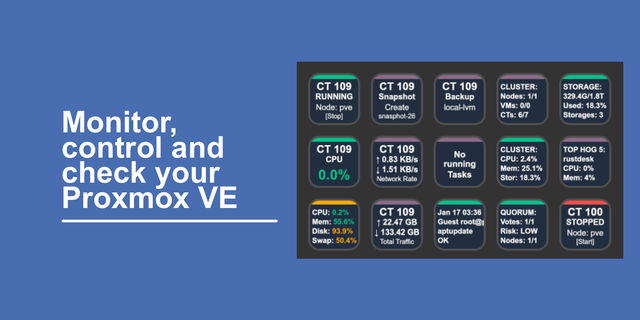
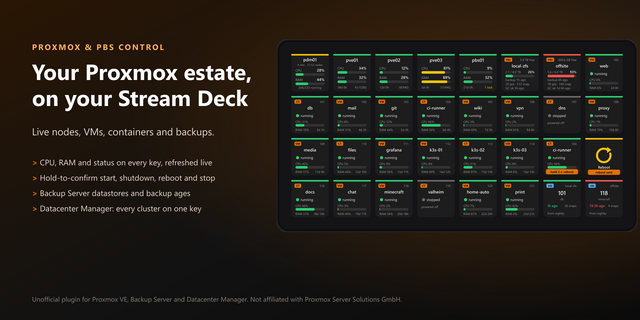
StreamProx shows your Proxmox VE cluster live on Stream Deck: every VM and LXC container gets a key with its state, CPU, RAM and network, and you start, stop or open it with a press. Built for homelabs running Proxmox, Docker and ProxMenux.
How it works: enter your Proxmox address and an API token once. Drag "Proxmox Profile" onto a key and press it; the included profile installs and fills itself with all your guests.
Included actions:
- VM / Container: live status, load as text, bars, gauge or graph; start, shutdown, reboot, console
Cluster / Node and Wide Graph: CPU, RAM and network history across up to 5 keys
Task Monitor, Snapshots (create, roll back) and Backup (age, back up now)
Container (Portainer): all Docker containers, update badge, start/stop/update
ProxMenux Value: node temperature, load and pending updates
SSH Command, MQTT and REST API keys with live status
3 ready-made profiles (Proxmox, ProxMenux, Docker) for the 15-key Stream Deck
Requirements: Proxmox VE 8 or newer with an API token. Optional: Portainer 2.x with an access token, ProxMenux Monitor. Stream Deck 7.1+, Windows 10+ or macOS 12+.
Setup tip: create the token in Proxmox under Datacenter > Permissions > API Tokens; the plugin links there directly.
English and German. Unofficial, not affiliated with Proxmox Server Solutions GmbH, Docker Inc. or Portainer.io.
Proxmox VE
One key per VM or LXC container, icon picked from OS, name and tags. Running guests in colour, stopped in grey.
CPU, RAM and network as text, bars, gauge or graph, set for all keys or per key.
Short and long press: web UI, console, start, shutdown, reboot, stop. "Start, shut down the others first" for nodes with little RAM, with guests you exclude.
Cluster and node keys, task monitor, snapshots (create, roll back, delete) and backups (age, size, back up now).
Wide graphs: neighbouring keys with the same settings join into one graph with the last hour, day or week from Proxmox.
Ready-made profiles Drag "Proxmox Profile" onto a key, press it and confirm the install. The profile fills itself with all VMs and containers. Also available for ProxMenux and Docker.
Docker via Portainer All containers with state and load. A UPD badge marks newer images. Start, stop, restart or update with a key.
ProxMenux Monitor Temperature, load and pending updates per node, found automatically on port 8008.
Tools SSH, MQTT and REST keys with short/long press and a live status value.
Requirements Stream Deck 7.1+ on Windows 10+ or macOS 12+, Proxmox VE (tested with 9.2). Optional: Portainer 2.x with access token, ProxMenux Monitor. English and German. Unofficial, not affiliated with Proxmox Server Solutions GmbH, Docker Inc., Portainer.io or ProxMenux.
Version 1.2
Oct 12, 2026
Details
Type
Engagement
Gaming
Lighting
Monitoring
Productivity
Smart Home
Streaming
Utilities
OS
Mac
Windows
Compatibility
Stream Deck 7.1 or later
Size
1.19 MB
Version
1.2
Language
English
German
Support
Neo Infobar support
No
Dial support
No
Profiles
Yes
You might also like