Gaming
Terraria Stream Deck Profile + Icons
by StreamSpell
Overview
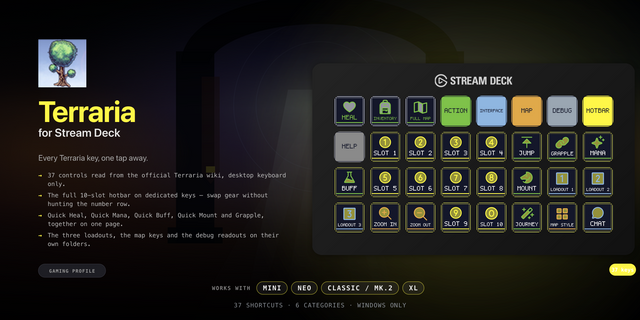
Bring 38 game shortcuts to your Stream Deck. Distinct category and action colours help you find controls at a glance.
Hotbar: Select hotbar slot 1, Select hotbar slot 2, Select hotbar slot 3, Select hotbar slot 4, Select hotbar slot 5, Select hotbar slot 6, Select hotbar slot 7, Select hotbar slot 8, Select hotbar slot 9, Select hotbar slot 10.
Adventure: Move up, Move down, Move left, Move right, Jump and fly, Grapple, Quick mount or dismount.
Utility: Quick heal, Quick mana, Quick buff, Auto select tool, Toggle smart cursor, Select equipment loadout 1, Select equipment loadout 2, Select equipment loadout 3.
Map: Toggle fullscreen map, Cycle minimap style, Increase minimap opacity, Decrease minimap opacity.
Interface: Inventory and crafting, Open chat, Journey Powers menu, Increase view zoom, Decrease view zoom, Camera Mode, Toggle HUD, Toggle FPS display, Cycle lighting setting.
Includes seven Windows .streamDeckProfile files, an installable .streamDeckIconPack, 2835 matching icons, including five category color collections, and a CSV file with key mappings.
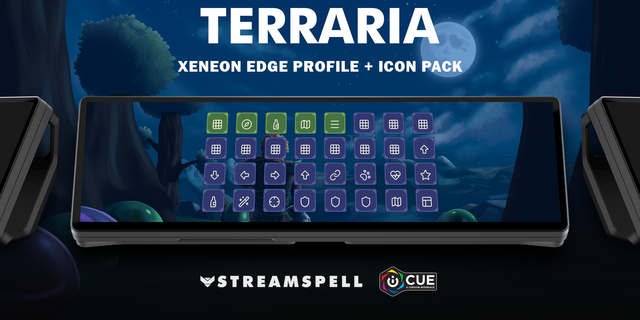
Compatibility: Stream Deck Mini, Neo, MK2, +, + XL, XL and CORSAIR Galleon 100 SD; Windows; Stream Deck app. No additional game mods required.
Use the default PC keyboard bindings with keyboard and mouse mode. Hold movement, Jump and Auto Select keys through Key Logic; release to stop. Hotbar keys select a slot only; aim and use items manually. Grapple and Mount require equipped items; quick consumables require inventory supplies. Journey Powers requires Journey mode and an open inventory. Chat opens the input only; type and submit manually. Camera Mode opens its interface; framing and capture are manual. View zoom uses the US =/+ and - keys; match these bindings on other keyboard layouts. Numeric-keypad map zoom, unbound Dash/Armor Set Ability/Next or Previous Loadout, mouse clicks and gameplay macros are not included.
Dial controls
On +: view zoom, minimap opacity, system volume and Stream Deck brightness. + XL adds direct selection of loadouts 1/2 and hotbar slots 1/2. Galleon: zoom/opacity on the left dial and volume/brightness on the right, in two layers. Each step sends a short tap. Press/touch are not assigned to game commands. Alternative touch strip backgrounds are included.
Not affiliated with or endorsed by the game’s creators.
Updated current-device previews, category color collections and matching ornamental touch strips. Added dial controls using existing zoom, map opacity, loadout and slot bindings, plus system volume/Stream Deck brightness. Existing38game shortcuts and navigation retained. Alternative strip backgrounds included.
Version 1.1
Oct 22, 2026
Details
Type
Gaming
Device
GALLEON 100 SD
Stream Deck +
Stream Deck Mini
Stream Deck MK
Stream Deck Neo
Stream Deck XL
Stream Deck + XL
OS
Windows
Compatibility
Stream Deck 7.1 or later
Size
20.33 MB
Version
1.1
Support
Icons
Yes
Dial support
Yes
Additional links
You might also like