Productivity
Things Deck
by NMPTK
Overview
Things 3 on your Stream Deck.
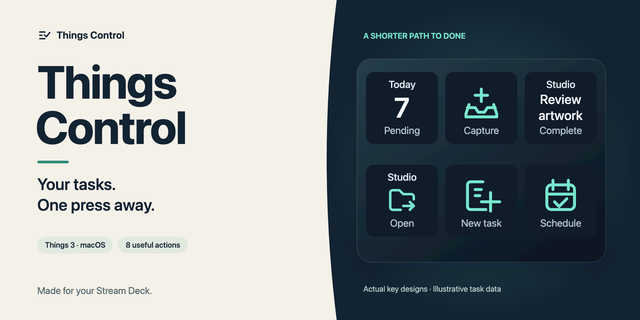
See Today, finish your next to-do and capture new ones without leaving what you're working on. Things Deck brings Things 3 to your Stream Deck keys, Stream Deck + dials and the Stream Deck Neo Infobar, and runs entirely on your Mac.
Next To-Do: your top Today item on a key. Press to complete it, press again within 5 seconds to undo, double-press to cancel, hold to move it to Tomorrow, This Evening or Someday (you choose which).
Today: a live count with a progress ring that fills as you get things done. Inbox shows what still needs sorting.
Dials: put Next To-Do on adjacent dials and they join into one scrollable Today list, with project names and deadline flags. Touch the strip to show a to-do in Things, hold to move it.
New To-Do: opens Quick Entry with When and project already set the way you like. On a dial, just turn to choose When. Copy a few lines first and they fill in for you: the first line becomes the title, bullets a checklist, plus deadline and tags.
Stream Deck Neo: your next to-do, Today or Inbox live in the Infobar.
Lists: jump to Upcoming, Anytime, Someday, Logbook and more.
Three themes like Things (Light, Dark, Black) and nine languages that follow your Mac.
Things Deck talks to Things only on your Mac through AppleScript and the Things URL scheme. No account, no cloud, no data leaves your computer.
Unofficial plugin; not affiliated with or endorsed by Cultured Code. Things is a trademark of Cultured Code GmbH & Co. KG.
Improved
• Dial cards: to-dos without a project now get a third line for the title.
• Project names now cover your whole Today list, not just the first 20 to-dos.
Fixed
• Project and area names show up again on keys, dials and the Infobar.
• Check off a to-do, turn the dial and check off the next: both undo rings keep running, and each to-do stays where it was.
• Checked-off to-dos no longer flash up as open or at another position while you scroll, and they leave right away.
• This Evening: the to-do moves straight to the end of Today instead of briefly showing in its old place.
Version 1.1.2
Nov 2, 2026
Details
Type
Productivity
OS
Mac
Compatibility
Stream Deck 7.6 or later
Size
391.68 KB
Version
1.1.2
Language
Chinese
French
German
Japanese
Korean
Spanish
Support
Profiles
No
Dial support
Yes
Neo Infobar support
Yes
You might also like