Business
TickTick Productivity Suite
by Magoo
Overview
TickTick shortcuts, ready.
Turn an Elgato Stream Deck into a focused TickTick command center for macOS and Windows. Capture tasks, search your workspace, sync changes, print, open TickTick Help, and manage everyday task actions without leaving the keyboard.
What you can do
- Create, save, complete, delete, duplicate, move, and select tasks.
- Jump to Inbox, Today, Tomorrow, Next Week, calendar, tags, lists, and settings.
- Set due dates, priorities, reminders, recurring tasks, subtasks, and time ranges.
- Use TickTick’s official desktop shortcuts for search, sync, print, navigation, and task input.
- Keep the same organized workflow on macOS and Windows with OS-specific native profiles.
What’s included
- A combined Stream Deck package with native macOS and Windows profiles.
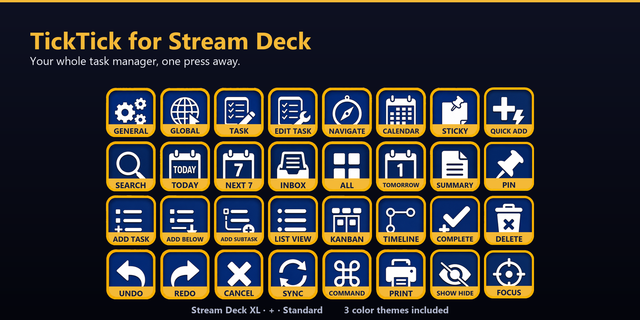
- 38 active keys across Home and four condensed categories: Basics + Navigation, Task Actions, Dates + Priority, and Input Syntax.
- Three icon themes: Main for categorical color coding, Brand for TickTick-inspired blue backgrounds, and Foucs for a dark focused workspace.
- Final icon assets, preview evidence, and documentation for installation and review.
Requirements
Elgato Stream Deck MK.2, Stream Deck software, and the TickTick desktop app. The profile uses TickTick’s official shortcut documentation as its source of truth. See the official https://help.ticktick.com/articles/7055780449171275776 for application details.
Disclaimer: This independent profile is not affiliated with or endorsed by TickTick or Elgato. Shortcut behavior may change with future software updates.
v2.1.0.0 — device expansion
This release expands the TickTick Productivity Suite to six Stream Deck device families on macOS and Windows while retaining the established 30-shortcut inventory and approved icon sets.
- Added native profiles for Stream Deck MK.2, XL, Mini, Neo, + Classic, and + XL across macOS and Windows.
- Added compact category and subgroup layouts with consistent Home navigation.
- Kept + Classic and + XL keys-only in this release
- Preserved Main, Brand, and Foucs icon sets plus the customer setup and attribution notices.
Version 2.1
Nov 4, 2026
You might also like