Audio
UAD Console
by HJF plugins
Overview
UAD Console Plugin
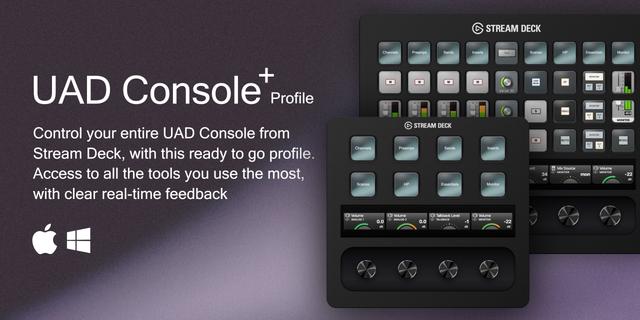
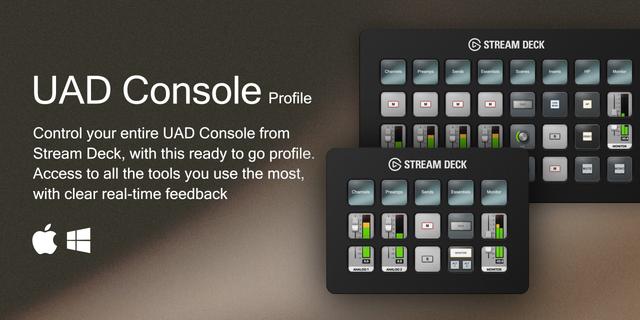
The UAD Console Plugin brings fast hands-on control of your entire UAD Console, with an Apollo or a Volt, to Stream Deck and Stream Deck+ (for Dial support). Stay in the flow and move faster with direct access to channels, cue outputs, monitor controls, inserts, full plugin parameters, and live visual feedback on every key.
Built for producers, engineers, and live users who want speed, clarity, and reliability in real sessions. This plugin is designed for daily use, with a focus on fast operation, clear states, and tight integration with UAD Console so your Stream Deck always reflects what is happening in the app.
What's inside?
Channels Volume, pan, mute, solo, mono, 48V, Hi-Z, Mic/Line, stereo link, solo safe, isolate, select-on-front, sends, and preamp/insert controls. Stereo-linked channels appear as one clean "(Linked)" entry.
UA Volt New: Volt 876, Gen 2 and Max show up as their own device: inputs, preamp with Vintage, 76 Comp, Tone and MAX, Cue sends, Monitor, Cue and headphone mixes, Talkback. Needs UAD Console 1.3.1+ (not first-gen Volts).
Cue Outputs Switch a cue or headphone output between Mix and Cue, enable Mono, and manage headphone and line cue paths. Mix Source reads your interface's real cue/headphone names (HP, Line 3/4, Cue 1-4).
Monitor Monitor volume, mono, mute, Dim and Dim Level, Alt Monitor select, source selection, headphone sends (HP 1-4), 24 dB mode, and more.
Inserts & Plugins (Apollo) Every UAD plugin on a channel or preamp insert appears as its own section: enable, disable, or toggle insert slots from a key. And it goes deeper, every plugin parameter is controllable, including continuous ones like Threshold and Make-up, with the plugin's own readout shown (e.g. "Thresh / -7.5 dB") and synced to UAD's own UI.
Talkback, Globals & Scenes Global Talkback (to-CR, level, mic select), Sample Rate, Clock Source, Tempo, Max Delay Comp, Undo/Redo, metering, recall any saved plugin Scene by name, and more.
Dials (Stream Deck+)
Two jobs per dial: separate Rotate and Press. Rotate Volume, press Mute; sweep a plugin's Threshold while Press fires a toggle, set value, or step up/down.
Rotate anything continuous: volume, pan, gain, send level, monitor level, tempo, and live plugin parameters.
Sensitivity tuned to the control: Low/Mid/High; on High one full turn sweeps the range, Low gives fine, surgical moves.
Natural dB feel: faders are fine near 0 dB and faster toward the bottom.
Live readout: the touchscreen shows the value, label, and a matching icon.
Visual Feedback True two-way live sync: any change in UAD Console (mouse, plugin window, or another app) shows on your Stream Deck almost instantly, typically under 50 ms, with no idle load. It stays connected, if UAD restarts, the link returns on its own and restores live state. Self-maintaining: loading/unloading a plugin rebuilds the list, and your existing key and dial setups migrate automatically.
Live on-key controls Volume keys become a channel strip with a moving fader and live L/R meter (a gauge on set-value keys), and Gain, Pan and Dim Amount get their own live rotary knobs that follow the value.
Icons A dedicated icon set with clear on/off states. Keys paint the correct icon instantly (no placeholder flash), multi-state controls show a distinct icon per value (Mix Source, Alt Monitor, Hi-Z), and keys carry readable text labels. Scroll mode steps multi-value controls one press at a time.
Setup:
Install the plugin
Open UAD Console
In Stream Deck, add a "Console" action, or a "Dials" action on Stream Deck+
Choose the channel, section, and function (on a dial, set Rotate and Press separately)
Built for real use Not just a utility, a practical control surface for daily work in UAD Console: it keeps you moving when creating, dependable during recording, and instant when speed matters most.
Newly added:
UA Volt support: Volt 876, Volt 1, 2 and 4 (Gen 2) and Volt 2, 4 and 4P Max now work, each as its own device with inputs, preamp (Gain, 48V, Phase, Hi-Z, Vintage, 76 Comp, Tone, MAX), Cue sends, Monitor, Cue and headphone mixes, Talkback and Session. Needs UAD Console 1.3.1 or newer (Volt 876: 1.2.7).
Visual Mute and Solo: MUTE ON / SOLO ON with the channel's live meter, and a soft glow while active. On by default, also on existing keys; switch Visual off on a key for the plain icon.
Profiles fit your interface: keys and dials made on another interface (like our free profiles) move to the same control on yours, and a key your interface has no match for keeps its setting.
ALL Mute, ALL Solo and ALL Record now cover every connected Apollo in a cascade, and respond faster.
Clear connection messages: the settings tell you why UAD Console can't be reached, and the controls load by themselves as soon as Console is connected.
Diagnostics report: in Help for Settings, one click saves a report ready to email to support.
A clearer Help page with sections and an explanation of every message.
Dials: stepped plugin parameters (a reverb mode, a pad switch) move one position per click.
Visual keys show their visual right away at start, and the Volume and Gain gauges sit a little higher.
Version 1.0.2.3
Oct 21, 2026
Details
Type
Audio
Music
Productivity
OS
Mac
Windows
Compatibility
Stream Deck 6.9 or later
Size
2.79 MB
Version
1.0.2.3
Language
English
Support
Neo Infobar support
No
Profiles
No
Dial support
Yes
You might also like
-thumbnail-optimized-50b68e75-6181-4feb-a469-51aba5745b87.jpeg)
-app-icon-optimized-bc7dc12f-7473-45e0-a5ab-ee515f624a38.png)