Lighting
Uncomplexer Light Control
Overview
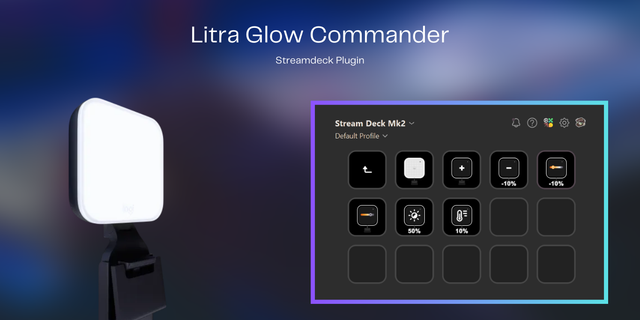
Control one or several Logitech Litra Glow lights directly from Elgato Stream Deck. Uncomplexer Light Control gives creators quick, tactile access to power, brightness, color temperature, presets, and smooth fades. Keys work across the Stream Deck range, while Stream Deck + adds dedicated dial controls with live LCD feedback.
Turn the light on or off and see its current state at a glance.
Adjust brightness and color temperature from 2700–6500 K using keys or Stream Deck + dials.
Save the current brightness and color temperature to a preset with a long press, then recall both with one touch.
Enable smooth transitions for power and preset changes.
Hold the Brighter, Darker, Warmer, or Cooler keys for continuous adjustment.
Assign each key or dial to one light or a group; a group switches and fades in sync.
Choose from five icon sets to match your setup.
Optional starter profiles help you get set up quickly.
Requirements: Stream Deck 6.9 or later; macOS 12 or later or Windows 10 or later; and a Logitech Litra Glow connected by USB. Litra Beam and Litra Beam LX support is experimental.
This independent, unofficial plugin is not affiliated with, endorsed, sponsored, or supported by Logitech. Logitech, Logi, and Litra are trademarks or registered trademarks of Logitech Europe S.A. and/or its affiliates; product names are used only to identify compatibility.
Find the Source Code on Github: https://github.com/uncomplexer/streamdeck-light-control
Light Control 1.3.0: control several lights
New
Multiple lights. Assign every key and dial to one light or create a group of lights. A group receives each command at once. It counts as "on" only when all its lights are on. Dials show "≠" while the lights' values differ. If no light is assigned the first connected light is addressed.
Names and titles. Every light gets a default name (model + serial tail, e.g. "Litra Glow EM8") and can be renamed in place. Keys show the names of their lights as title unless you set your own.
Unplugged lights stay known: keys assigned only to them are dimmed and ignore presses. "Search for lights" in the plugin settings picks up lights plugged in later.
Changed
Property Inspector layout: key settings first, then the "Controls" list, then a collapsible "Plugin settings (all keys)" block for global settings.
Persisted state is kept per light, identified by USB serial number, so assignments survive re-plugging.
Fixed
Dials and step keys no longer replace a key's other settings when they first appear.
With several lights, a re-plugged light is picked up again; the reconnect timer used to stop as soon as any light was connected.
Version 1.3
Sep 8, 2026
Details
Type
Lighting
Productivity
Utilities
OS
Mac
Windows
Compatibility
Stream Deck 6.9 or later
Size
1.15 MB
Version
1.3
Language
Chinese
English
French
German
Japanese
Korean
Spanish
Support
Profiles
Yes
Dial support
Yes
Additional links
You might also like