Monitoring
UniFi Network Monitoring
by WDX Global
Overview
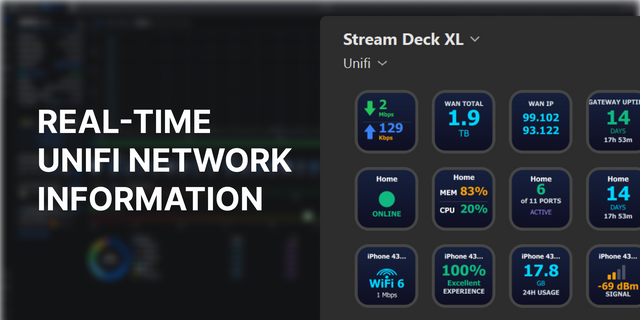
UniFi Network brings your Ubiquiti console to Stream Deck: 24 actions - every one of the plugin's 12 capabilities as both a Keypad key and a Stream Deck+ dial - built entirely on Ubiquiti's own local Network Integration API. There's no UniFi cloud account, no relay server, and no third-party API involved; every request goes straight from your computer to your console using a local API key you generate yourself.
### What's included
Monitor & Alert
- UniFi Status - a live metric (all/wired/WiFi/WiFi-guest clients, adopted or offline devices), with optional colour-coded alerting as a count climbs.
UniFi Device Health - CPU%, RAM%, uptime, or a combined view, for any device on your network.
UniFi WAN Traffic - live download/upload throughput, colour-coded against your ISP's own rated speed with a configurable alert threshold.
Toggle Controls
- UniFi WiFi / Network / Firewall Toggle - enable or disable a WiFi network, VLAN, or user-created firewall policy (built-in default-deny/return-traffic rules are excluded). Each shows current state at a glance (green = on, red = off/paused), cycling the live list on a short press/rotate and acting on whichever is shown with a long press/push.
Guest Management
- UniFi Authorize / Revoke Guest - grants or revokes a named guest's network access.
UniFi Guest Voucher - generates a hotspot voucher and shows the code on the key.
Device Actions
- UniFi Restart Device - restarts any device, with a visible red confirmation flash.
UniFi PoE Port Cycle - power-cycles a PoE switch port, with a best-effort connected client name shown alongside it.
UniFi DNS Record Toggle - fixes or releases a client's DHCP-reserved IP address.
### How it talks to your console
- Every action authenticates with a local API key generated once from your console's own settings - requests go straight to your console's local address, nothing leaves your LAN, no UniFi cloud account involved.
All 24 actions share one connection by default, configured once from any action's Property Inspector.
Per-action host override lets any individual key or dial connect to a different console instead - useful for managing more than one site.
Every Property Inspector is organized into Plugin / Actions / Appearance tabs.
The clearest status-driven actions (WiFi/Firewall Toggle, Status, Device Health, WAN Traffic) have independently configurable Safe/Alert colours; the rest share a plugin-wide Main/Accent theme. Every colour has its own reset-to-default button.
### Requirements
- A UniFi console (UDM, UDM Pro, Cloud Gateway, or similar) on your local network.
A local API key, generated from the console's own settings - https://developer.ui.com/
Stream Deck+ dial actions require Stream Deck+ hardware; the 12 Keypad actions work on any Stream Deck.
New: you can now connect to your UniFi console remotely over the internet Fixed: opening several settings screens in quick succession could trigger a "rate limited" error from UniFi Fixed: the Actions tab now opens by default
Version 1.2.1
Aug 4, 2026
Details
Type
Monitoring
OS
Mac
Windows
Compatibility
Stream Deck 7.1 or later
Size
214.28 KB
Version
1.2.1
Language
English
Support
Profiles
No
Dial support
Yes
You might also like