Creative Tools
Unity Shortcut Profile
by Adx.cool
Overview
The complete Unity keyboard shortcut pack for Stream Deck.
50 shortcuts across 6 categories — organized, scored by importance, and ready to install on any Stream Deck model. Stop memorizing key combos. One tap, one action.
What's included:
• Edit (11): Undo, Redo, Cut, Copy, Paste, and 6 more • Window (10): Scene View, Game View, Inspector, Hierarchy, Project, and 5 more • Animation (9): Play Animation, First Keyframe, Last Keyframe, Prev Frame, Next Frame, and 4 more • Tools (8): Pan Tool, Move Tool, Rotate Tool, Scale Tool, Rect Tool, and 3 more • Scene (8): New GameObject, New Child, Move to View, Align with View, Lock to Object, and 3 more • File (4): Save Scene, New Scene, Open Scene, Build Settings
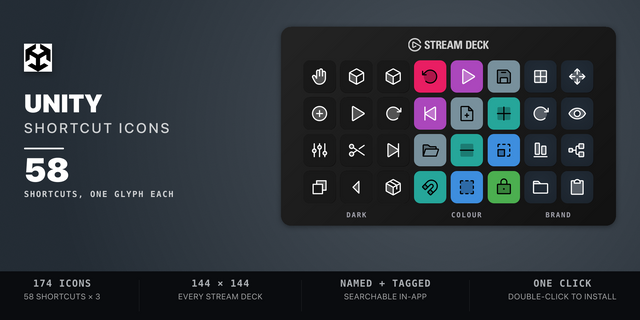
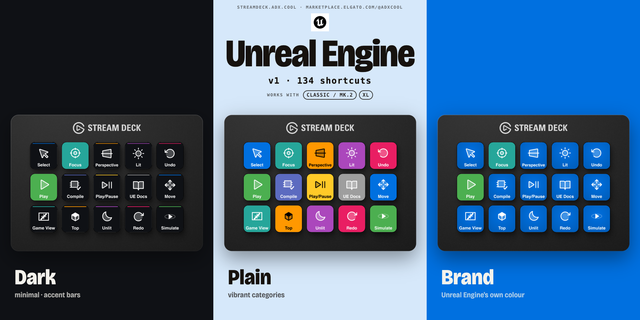
Features: • Three icon themes: Dark (minimal, accent bars), Plain (vibrant category colors), and Brand (app signature color across all keys) • Folder-based navigation with category pages for quick access • Auto-organized layout — most important shortcuts first • Works on all Stream Deck models (Mini, Neo, Classic, XL) • Available for macOS and Windows
Setup:
Double-click the .streamDeckProfile file to install
Open Stream Deck app → Preferences → Profiles
Click your profile → Application → select Unity The profile will activate automatically when Unity is in focus.
Learn more about Unity: https://unity.com
v4.0 — every key gets its own icon, and the profile now finds Unity by itself on Windows. • Galleon 100 SD: a profile made for its 12 keys and two dials — Folders, Frame, Grid Size, Keyframe — native dials, nothing to install. Checked against Unity 6.6 (6000.6) and 6000.0 LTS: • Vertex Snap is now the toggle (Shift+V): plain V only snaps while held, so a key tap did nothing. • The Cmd/Ctrl+0 key opens the Services window and is named so; Version Control has no default key.
What's fixed: • Thirteen keys were wearing a glyph another key already had — Game View, Play and Play Animation were the same triangle, Copy and Duplicate the same sheet, Rotate, Refresh and Redo the same arrow. Every one of the 61 keys now carries its own. • Eight glyphs were drawn for Unity rather than borrowed: Pivot/Center, Local/Global, the Game view, the animation playhead, Step, asset refresh, and new GameObject / new child. • Windows users no longer point the profile at Unity by hand — it auto-activates when the Unity Editor takes focus. On macOS the Hub stores each editor under a versioned path, so that binding is still one manual step. • New Help folder: the Manual, the Scripting API and the Shortcuts Manager, one tap each.
61 Unity 6 Editor shortcuts across Tools, Scene, Window, Edit, Animation, File, Grid & Snap and Help.
Existing customers: re-install the .streamDeckProfile files to pick up the new icons and the Windows auto-switch.
Version 4
Nov 11, 2026
Details
Type
Creative Tools
Development
Device
Stream Deck Mini
Stream Deck MK
Stream Deck XL
OS
macOS
Windows
Compatibility
Stream Deck 6.4 or later
Size
7.38 MB
Version
4
Language
English
Support
Additional links
You might also like