Development
Windows Terminal Hotkeys
Overview
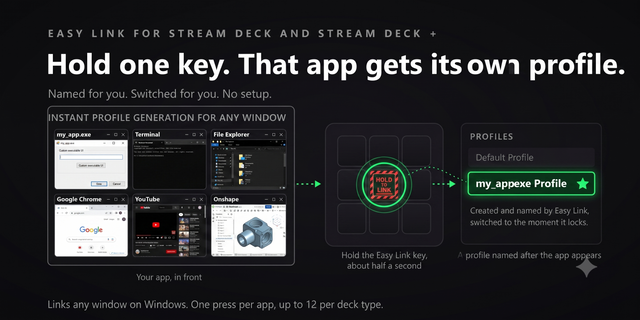
Hold the Easy Link key while Windows Terminal is in front and the link is made: the deck follows the app you are in. Windows Terminal Hotkeys drives Windows Terminal from your Stream Deck: PowerShell, Command Prompt, Azure Cloud Shell, WSL. Nine dials work the terminal from the Stream Deck + and Stream Deck + XL, 61 default-bound commands sit on real keys across 14 categories, and six bundled profiles cover the Stream Deck, Stream Deck +, Stream Deck + XL, Stream Deck XL, Stream Deck Mini and Stream Deck Neo.
EASY LINK, BUILT IN
The Easy Link module is built in, nothing else to install. Hold the key about a second while Windows Terminal is in front and the deck binds it to this plugin's profile. The profile switches in whenever Windows Terminal takes focus: leave it and your previous profile returns. A short press does nothing, so a stray tap never relinks. Easy Link sits on the top-left key of every bundled profile, and lock, fail and clear cues play out of the box.
NINE DIALS
- Font Size: turn to change the font size, one step per click. Press to reset.
- Scrollback: turn to scroll the active window with real mouse wheel input, so it also scrolls full-screen apps with no scrollback of their own, Claude Code and other TUIs included. Press to jump to the bottom.
- Tab Cycle: turn to move between tabs, press for a new tab. Tap the strip for the previous or next tab, hold it to close the current one.
- Pane Resize: turn to grow the active pane, press to focus the last pane. Hold the strip to split the panes side by side.
- Profile Picker: turn to step through the profiles in your Windows Terminal settings, press to open a new tab with the one the dial shows.
- Tab Colour: turn through the 16 tab colours plus Reset, press to colour the current tab.
- Opacity: turn to choose a background opacity for the current profile, press to apply it.
- Colour Scheme: turn to step through your colour schemes, press to apply the one showing.
- Context Gauge: the Claude Code gauge below, on a dial.
Each dial paints its own art on the touch strip. The tab colour, opacity and colour scheme dials drive Windows Terminal's own command palette and check each step landed before taking the next.
THE CLAUDE CODE CONTEXT GAUGE
A key and a dial that show how much of the context window the running Claude Code session has used, read live from the session's own transcript, with a warning band as auto-compact gets close. Press or turn to step between live sessions. It reads Claude Code's files only and sends no keystrokes.
TWO LOOKS, STUDIO AND CLASSIC
Fresh installs get Studio, the new instrument panel faces. Updating from 2.1? Every key you already placed keeps its Classic face, the retro CRT look with phosphor-green labels and category-coloured rims. Switch any key, or all keys, between the two in the property inspector.
MORE ON THE KEYS
Drop a category action onto any key, pick the command from the dropdown, and the key wears that command's art. Every key ships with Windows Terminal's stock shortcut and every key is remappable: type your combination into the property inspector or click Capture and press it once. Cursor Pad is a real arrow key that holds and repeats; place four in a cross for a directional pad, or use the one the Stream Deck + XL and Stream Deck XL profiles ship. Tab Colour puts one of the 16 swatches, or Reset, on a key. And every key can play a sound on press: 33 ship in the box, and our free Sound Sampler adds your own recordings to the picker.
BUILT FOR WINDOWS TERMINAL
Windows Terminal Hotkeys 3.1.1. Still 61 commands in 14 categories, nine dials and six bundled profiles, built against Windows Terminal 1.24.
Pick by face: a command key's settings now show its category's commands as a grid of their key art.
Fixed: a custom hotkey captured with an arrow key or a number pad operator (+, -, *, / or .) never fired. Capture now stores them in a form the plugin can send; capture any such hotkey set before this update again.
Easy Link: the linked key now shows the app's icon above its name when one can be read, and its settings show each link as the face it wears on the deck. A failed link plays a shorter chime. Easy Link is now a key action only; if you put it on a dial, move it to a key.
Easy Link on several decks: the Stream Deck app installs one new profile at a time, so linking several decks at once could leave all but one on its old profile. Each extra deck now comes up about 12 seconds after the one before, once per deck.
Version 3.1.1
Oct 14, 2026
Details
Type
Development
Monitoring
Productivity
Utilities
OS
Windows
Compatibility
Stream Deck 6.9 or later
Size
3.73 MB
Version
3.1.1
Language
English
Support
Neo Infobar support
No
Profiles
Yes
Dial support
Yes
You might also like