Development
Z.ai Usage Deck
by ZeroQuarry
Overview
Your GLM Coding Plan, live on your Stream Deck. Z.ai Usage Deck keeps every quota window in view... how much is left, when it resets, how fast you're burning it, and what ZCode is doing.
THE EIGHT ACTIONS
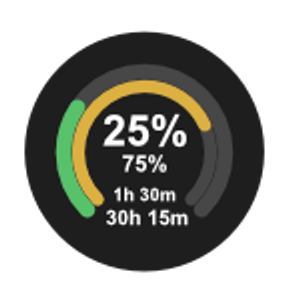
What Remains: rainbow arches whose filled length is the quota left in each window. A full rainbow is a fresh plan; a stub is one you nearly drained. The reset countdown rides under the arch
Reset Timer: a live countdown to the next reset. The shorter window on top, the longer one beneath, ticking every second on the key's own clock (it never hammers the API to do it)
Pace: how long each window lasts at the pace it is being drained: "~2H 10M". The estimate comes from watching your own readings, so it says "warming up" for the first few minutes and "steady" when nothing is running
24h Tokens: a sparkline of token burn across the last day, the current hour brightest
Model Mix: which models burned those tokens: the leader's share of the day, then the runner-up
Status/Refresh: plan label, tokens used in the last 24 hours, and how old the reading is. Press any key to refresh on demand
Agent Confirm: when ZCode wants permission for a tool call, a key lights up: the tool, what it wants, how many are queued. Press to approve, hold to deny
Agent Stopped: lights up green when a ZCode thread finishes responding, with the first line of its last message
WORKS WITH YOUR ACCOUNT, WHEREVER IT LIVES
Global (api.z.ai) or China (open.bigmodel.cn)
Personal scope, or team scope with Organization and Project IDs
Auto-detect finds your key in the environment or in local tool configs (CodexBar, OpenCode, BigModel and more)
Test connection reads your real quota and reports the windows it found before you commit to anything
Refresh cadence from 15 seconds to an hour with automatic backoff, plus an immediate re-read when your computer wakes
THE AGENT KEYS, SAFELY
The two agent keys talk to the ZCode CLI through hook scripts bundled inside the plugin; one command installs them. While the keys are on screen, permission decisions land on your deck; take the keys away and the app's own dialogs return exactly as before.
PRIVACY, PLAINLY
The plugin talks to exactly one service: the z.ai host you configure, using your own API key, exactly as the web console would. No telemetry, no analytics, no third-party requests of any kind. The key lives in Stream Deck's settings on your machine and is only ever displayed masked.
SETUP
Install, drag in a key, paste your API key (or press Auto-detect), press Test connection. Pressing a key before it is configured opens the docs at the exact section you need. Requires Stream Deck 7.1+, macOS 12 or Windows 10, and an active GLM Coding Plan.
Z.ai, Zhipu AI, BigModel, GLM and ZCode are marks of their respective owners; ZeroQuarry is unaffiliated with them and with Elgato. Docs and support: https://zaideck.zeroquarry.com
Welcome to Z.ai Usage Deck 2.2: your GLM Coding Plan on eight keys.
QUOTA AT A GLANCE
What Remains: rainbow arches show the quota left in each window, with the reset countdown under the arch. A full rainbow is a fresh plan; a stub is one you nearly drained.
Reset Timer: a live countdown to the next reset: the shorter window on top, the longer one beneath, ticking on the key's own clock.
Pace: how long each window lasts at the pace it is being drained. It says "warming up" while it learns your readings and "steady" when nothing runs
24h Tokens: a sparkline of the day's token burn, the current hour brightest
Model Mix: which models burned those tokens, the leader's share first
Status/Refresh: plan label, 24-hour tokens, and reading freshness. Press any key to refresh on demand
ZCODE AGENT KEYS
Agent Confirm lights up when ZCode needs a permission decision: press to approve, hold to deny. Remove the key and the app's own dialog returns exactly as before
Agent Stopped glows green when a thread finishes responding
One command (the installer ships inside the plugin) wires them up, and pressing an unconfigured key opens the docs at the section that unblocks you.
Docs and support: https://zaideck.zeroquarry.com
Version 2.2
Sep 24, 2026
Details
Type
Development
Productivity
Utilities
OS
Mac
Windows
Compatibility
Stream Deck 7.1 or later
Size
255.56 KB
Version
2.2
Language
English
Support
Profiles
No
Dial support
No
Neo Infobar support
No
You might also like