Creative Tools
Adobe InDesign Shortcut Profile
by Adx.cool
Overview
The complete Adobe InDesign keyboard shortcut pack for Stream Deck.
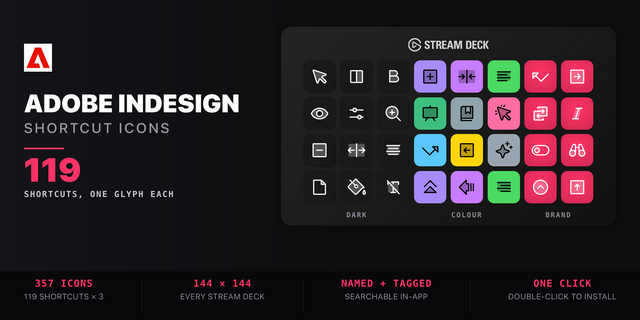
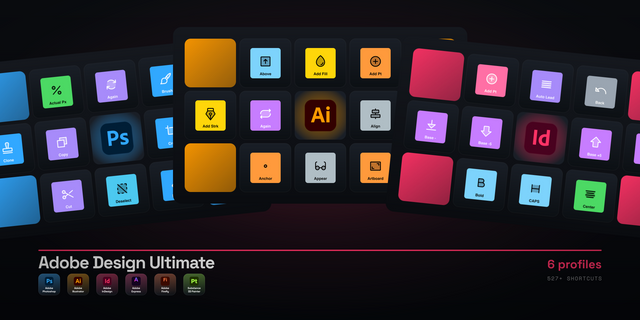
119 shortcuts across 13 categories — organized, scored by importance, and ready to install on Stream Deck Classic / MK.2, XL. Stop memorizing key combos. One tap, one action.
What's included:
• Tools (25): Selection Tool, Direct Selection, Page Tool, Gap Tool, Hand Tool, and 20 more • Panels (15): Control Panel, Char / Para Mode, Character Panel, Paragraph Panel, Paragraph Styles, and 10 more • View (13): Preview Mode, Display Quality, Previous Zoom, Fit Selection, Go To Page, and 8 more • Text (11): Line Start, Line End, Prev Paragraph, Next Paragraph, Story Start, and 6 more • Character (10): Bold, Italic, Normal, Underline, Strikethrough, and 5 more • Size & Leading (9): Point Size +, Point Size -, Point Size +5x, Point Size -5x, Leading +, and 4 more • Kerning (9): Tracking -, Tracking +, Tracking -5x, Tracking +5x, Clear Kerning, and 4 more • Tables (8): Next Cell, Prev Cell, First Cell in Column, Last Cell in Column, First Cell in Row, and 3 more • Fill & Stroke (6): Toggle Fill / Stroke, Swap Fill & Stroke, Apply Color, Apply Gradient, Apply None, and 1 more • Paragraph (6): Align Left, Align Center, Align Right, Justify All, Align to Grid, and 1 more • Find (5): Text to Find What, Find Selected Text, Find Next, Text to Change To, Replace Selection • Workflows (1): Preview + Fit Selection • Help (1): InDesign Help
Features: • 119 shortcuts across 13 folders, every one read off Adobe's own InDesign shortcut table — Windows and macOS columns both • The typography keys a typesetter actually reaches for: point size and leading up and down, at 1× and 5×, tracking, baseline shift, and clear-all-kerning • Both directions of every increment. Adobe writes them as one line — "Increase/decrease leading" — and a profile that reads it carelessly ships only the increase • All 13 panels on single keys: Control, Character, Paragraph, Paragraph Styles, Character Styles, Tabs, Layers, Pages, Color, Swatches, Stroke, Drop Shadow • The full tool palette — 25 tools, from the pen and anchor-point pair to the frame, shape, transform and gradient tools • Table navigation as its own folder: next and previous cell, first and last in the column and the row, and the two row-break keys • Find and Change on five keys, including insert-selection-into-Find-What, which is the one nobody remembers
Install: double-click any .streamDeckProfile to import. On Windows the App binding is pre-filled to Adobe InDesign and auto-activates on focus. On macOS, set it once under Stream Deck → Preferences → Profiles → App.
Also included: the 357-icon Adobe InDesign icon pack (119 icons in 3 finishes), as a .streamDeckIconPack you can install with a double-click. Every key in this profile, available to drop on any action you like.
Try it first: press the keys of this profile in your browser, no install — https://streamdeck.adx.cool/try/indesign/
Learn more about Adobe InDesign: https://www.adobe.com/products/indesign.html
v1.0 — first release
119 shortcuts across 13 folders, machine-read from Adobe's own InDesign keyboard-shortcuts table: 23 tables, 185 rows, each row's Windows and macOS column pushed through the hotkey encoder and only shipped where both resolve.
The typography set in full: point size, leading, tracking and baseline shift, up and down, at 1x and 5x
All 13 panels and all 25 tools on single keys
Table navigation and Find & Change as their own folders
Every key carries its own glyph — 119 shortcuts, 119 distinct icons
Windows Smart Profile binding included (InDesign.exe)
Version 1
Sep 15, 2026
Details
Type
Creative Tools
Productivity
Device
Stream Deck MK
Stream Deck XL
OS
macOS
Windows
Compatibility
Stream Deck 6.4 or later
Size
9.38 MB
Version
1
Language
English
Support
Icons
Yes
Additional links
You might also like