Artistic
GIMP macOS Studio Deck
Overview
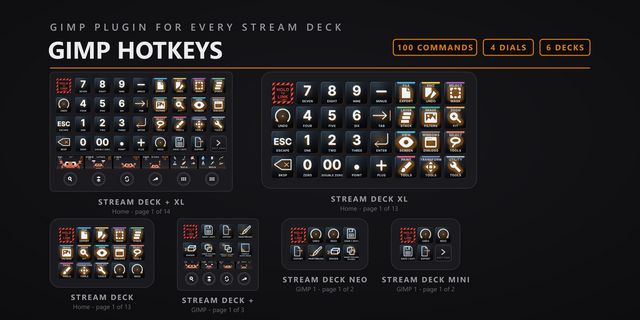
Control GIMP 3.2.4 from your Stream Deck: 107 GIMP commands on 12 remappable category keys, plus 13 dials, 11 with live readouts taken from GIMP (brush size, opacity, the selected layer and more). Six bundled profiles: Stream Deck, Stream Deck Mini, Stream Deck XL, Stream Deck +, Stream Deck Neo and Stream Deck + XL. Built for GIMP 3.2.4 on macOS 13 or later.
SETUP ON A MAC
Click OK when macOS asks to let Elgato Stream Deck control System Events. Accessibility has no prompt: add Elgato Stream Deck under System Settings, Privacy & Security, Accessibility, then quit and reopen the Stream Deck app. Keys send only while GIMP or one of its dialogs is the front window; with anything else in front the key refuses with an alert.
The live dials and the two Script-Fu commands need GIMP's Script-Fu server, and the plugin starts it for you: installing adds a one-click starter to GIMP (Filters > Development > Script-Fu > Start Deck Server) and the deck presses it when GIMP is in front and the server is off. Restart GIMP once after install; the server is local, 127.0.0.1 port 10008. Without it the 105 keystroke commands and the two blind dials keep working, the list dials dim and say so, the value dials hold a static face and do nothing (Brush Size alone falls back to GIMP's bracket keys), and the two Script-Fu commands show an alert. Once it is up, the dials pick it up on the next turn.
EASY LINK, BUILT IN
Hold the Easy Link key for a second while GIMP is in front: the deck binds GIMP to this plugin's profile, switches in whenever GIMP takes focus, and hands back when you leave.
THIRTEEN DIALS
- Canvas Zoom: turn sends GIMP's Zoom In and Zoom Out shortcuts, press sends 1:1 (100%). No readout.
- Undo/Redo: turn left sends Undo, turn right sends Redo. No readout.
- Layer Select, Brush Select, Paint Mode and Palette Select: a rolling list on the touch strip, the selection in the middle, read live from GIMP; it applies on settle or press.
- Brush Size, Opacity, Brush Hardness, Brush Angle, Brush Aspect Ratio, Brush Spacing and Feather Radius: the value live on the face with a thick bar.
The Stream Deck + profile seats Canvas Zoom, Undo/Redo, Layer Select and Brush Size, four dials on page one. The Stream Deck + XL profile adds Opacity and Brush Select, six dials on its page.
WHAT'S INCLUDED
- 12 remappable category actions covering 107 commands: File, Edit, Select, Layers, Image & Filters, Zoom, View & Interface, Windows & Dialogs, Select Tools, Paint Tools, Transform Tools and Utility Tools. Drop a category key on the deck, pick the exact command in the property inspector, and the key takes that command's face.
- 105 keystroke commands sent as GIMP's own macOS shortcuts, plus two Script-Fu commands, Fill with FG Color and Anchor Layer, which have no usable macOS shortcut and run through the server.
- Nine zoom preset keys, 16:1 (1600%) down to 1:16 (6.25%), beside Zoom In, Zoom Out, Fit Image in Window and Revert Zoom. They are GIMP's bare digit shortcuts and land only while the canvas has keyboard focus.
- Six bundled profiles, Easy Link on each: a thirteen-page Stream Deck profile, a thirteen-page Stream Deck XL profile and a thirteen-page Stream Deck + XL profile, each a hub page of 12 category keys opening a page per category, six dials on every page of the Stream Deck + XL; a two-page Stream Deck + profile with four dials on page one; a three-page Stream Deck Mini profile with page keys; and a one-page Stream Deck Neo profile, seven of the twelve categories, nothing on its info bar. The dials need a Stream Deck + or Stream Deck + XL.
- Purpose-drawn key faces for all 107 commands and every category key.
GIMP macOS Studio Deck 1.0 puts GIMP's own shortcuts on the deck, with a touch tool bar, a number pad and one GIMP Dial. No server to start and nothing installed into GIMP.
Touch tool bar. GIMP's toolbox on the Stream Deck + touch screens. Tap a tool and GIMP switches to it. 37 tools are wired, six to a screen. The Stream Deck + spreads them over two pages, 24 then 13; the Stream Deck + XL fits 36 on its one page.
Number pad. 18 keys that type straight into whatever GIMP field you have focused: digits 0 to 9, double zero, decimal point, minus, plus, Tab, Enter, Escape and Backspace.
One GIMP Dial. The four dial jobs sit behind a single action. The bundled Stream Deck + profiles seat all four ready to turn, and a dial you place yourself picks its job in the property inspector: canvas zoom, undo and redo, layer navigation or brush size. Each paints its own art on the touch screen and the art moves as you turn. Brush Size accelerates, so a big change is one flick.
Removed: the Script-Fu server route, its auto-start plug-in and the live dial readouts from the earlier 1.0.0.0 pack. This version installs nothing into your GIMP profile and starts nothing, and no dial waits on a server. Keys and dials send GIMP's own shortcuts.
Version 1
Sep 4, 2026
Details
Type
Artistic
Development
Engagement
Productivity
Social
Streaming
Video
OS
Mac
Compatibility
Stream Deck 7.5 or later
Size
5.41 MB
Version
1
Language
English
Support
Profiles
Yes
Dial support
Yes
Additional links
You might also like