Business
Gmail Stream Deck Profiles
by FlowKits
Overview
📬 Gmail for Stream Deck. Start free with Lite. Upgrade to Pro for a live email inbox and dials.
Put Gmail on your Stream Deck and speed up your email workflow. Lite is a free, one-press launcher that works the moment you import it. Pro adds the live, hands-on layer, powered by the Gmail Notifications plugin ⚡
🎚️ Do you need Pro or Lite?
⭐ Pro Pro profile, plus features that are powered by the Gmail Notifications plugin, which is required for Pro: ➡️ Required Gmail Notifications Plugin:
https://marketplace.elgato.com/product/gmail-notifications-84705a57-6599-469c-b2e8-f66ad4d14c07
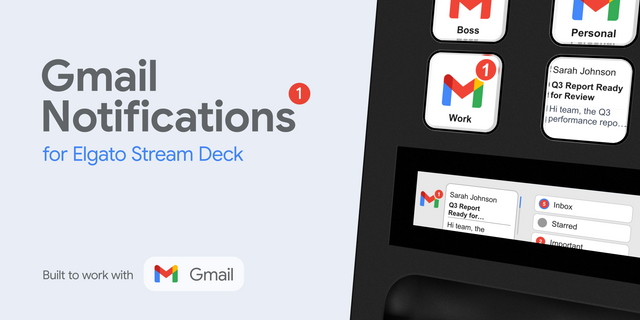
📨 Live unread badge on a key, refreshed automatically, with an optional new-mail sound.
👀 Email Preview shows the latest sender and subject right on the key.
🔎 VIP sender and saved-search monitors. A key for your boss, another for a query that matters.
🎛️ LCD dial widgets on Stream Deck + and Plus XL: scroll your inbox, read the email body, and dial your accounts and labels.
🗂️ Multiple Google accounts, watched side by side.
🆓 Lite Free, and instant profile (no live data)
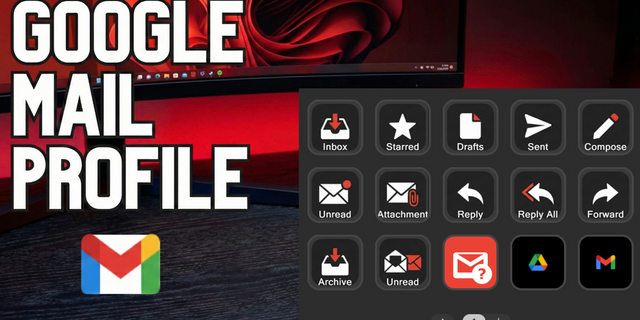
✅ One-press launcher for your whole email inbox: Inbox, Compose, Unread, Starred, Important, Sent, Drafts and Snoozed.
✅ Jump to your Gmail category tabs, any label, and saved searches.
✅ Open Google Calendar, Meet, Contacts, Keep, Drive and Chat from a key.
✅ Works the moment you import it. No plugin, no sign-in, no setup.
✅ All 7 Stream Deck devices, Windows and Mac.
🔌 How Pro Works
Pro's live counts, previews, monitors and dials run on the Gmail Notifications plugin, available on the Elgato Marketplace. Install it, sign in once with Google, and the Pro profile lights up. Lite needs none of this — it works on its own.
🖥️ Works on Every Stream Deck
Stream Deck Mini, Neo, MK.2, +, XL, Plus XL and Galleon 100 SD. The Pro dial widgets light up on Stream Deck + and Plus XL. Fully compatible with Windows and macOS.
📦 What's Included
✅ Lite and Pro profiles for all 7 devices, ready to import on Windows and Mac.
✅ Pro unlocks 15 Gmail actions, 16 key themes, 8 LCD themes and 9 notification sounds via the plugin.
✅ Free Lite version, no account required.
✅ Setup guide at getflowkits.com/setup/gmail-notifications
🎯 Perfect For
Anyone who lives in Gmail and wants fewer trips to the tab. Start with Lite for free, and upgrade to Pro when you want the inbox to tell you.
📬 Less Checking, More Doing.
Disclaimer
Independent FlowKits product, not affiliated with or endorsed by Google. Gmail, Google Calendar, and Google Meet are trademarks of Google LLC, used solely to identify compatibility. Pro requires the Gmail Notifications plugin, verified for the gmail.readonly scope.
Overhaul of profiles and errors resolved.
Pro
One press to any view: Inbox, Starred, Sent, Drafts, Spam, Trash, and the category tabs. Every opener ships pre-set, and you can repoint any of them in the plugin's settings.
Compose, Calendar, and Meet, with Keep and Drive alongside, all in full-color Google logos.
Lite (free)
Clean, readable keys with the same full-color app logos as Pro.
A tighter set of keys, focused on the views you actually open.
Both
Related keys are now grouped into workflow blocks. The same layout language runs across every device. Less hunting, more doing.
Version 1.1
Jul 6, 2026
Details
Type
Business
Productivity
Device
GALLEON 100 SD
Stream Deck +
Stream Deck Mini
Stream Deck MK
Stream Deck Neo
Stream Deck XL
Stream Deck + XL
OS
macOS
Windows
Compatibility
Stream Deck 7.1 or later
Size
863.69 KB
Version
1.1
Language
English
Support
Dial support
Yes
Additional links
You might also like