Utilities
Mac Control Lite
by Kuberstar
Overview
One-press control of your Mac, right from Stream Deck.
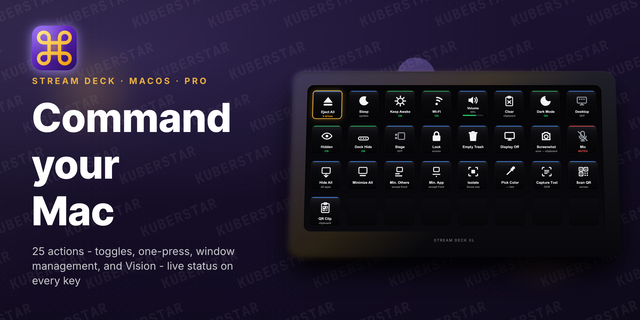
Eject every external drive, put the Mac or the display to sleep, toggle Wi-Fi, set the volume, and clear the clipboard - each on its own key, with live status so you always see the current state.
Included actions:
Eject All: safely unmount every external drive at once, with a live count of what is mounted
Sleep: put the Mac to sleep instantly
Wi-Fi: toggle Wi-Fi on or off, the key shows the current state
Volume: mute, raise, or lower system volume on a key, or rotate a Stream Deck + dial to adjust and press to mute
Clear Clipboard: empty the clipboard contents in one press
Every Lite action works out of the box with no permission prompts. Upgrade to Mac Control Pro for Keep Awake, Desktop Icons, Hidden Files, Dock Auto-hide, Stage Manager, Dark Mode, Lock Screen, Empty Trash, Display Off, Screenshot, Mic Mute, window management, and on-screen text, QR, and colour capture.
Requirements: macOS 10.15 or later, Stream Deck 6.9 or later.
Changed
Tightened the Lite/Pro split. Lite now ships the five permission-free essentials: Eject All, Sleep, Wi-Fi, Volume, and Clear Clipboard. Keep Awake, Desktop Icons, Hidden Files, Dock Auto-hide, and Stage Manager moved to Pro.
Added
Initial release. Lite tier: Eject All, Sleep, Wi-Fi, Volume, Clear Clipboard.
Pro tier adds Keep Awake; live-state toggles for Desktop Icons, Hidden Files, Dock Auto-hide, Stage Manager, and Dark Mode; Lock Screen, Empty Trash, Display Off, Screenshot (area / window / full screen → clipboard or Desktop), and Mic Mute; window management (Hide All Windows, Minimize All Windows, Minimize All But Front, Minimize App But Front, Isolate Window); and Vision - Pick Color to hex, Capture Text (OCR), Scan QR Code, and Scan QR from Clipboard.
Live status on toggle and eject keys; permission-gated Pro actions open the matching System Settings pane on first use.
Version 1
Jul 8, 2026
Details
Type
Utilities
OS
Mac
Compatibility
Stream Deck 6.9 or later
Size
190.07 KB
Version
1
Language
English
Support
Profiles
No
Dial support
Yes
Additional links
You might also like