Artistic
macOS Terminal Complete
Overview
79 Terminal commands fire from keys that show what they carry, and 8 dials do what a keyboard cannot: scrub scrollback, walk the cursor along the command line, roll through your own saved commands. Built for the Terminal that ships on every Mac, and built to be safe to press: anything that types into a shell goes to the plugin's own Terminal window by default, so a stray press never lands in the shell you are working in.
SETUP
Click OK when macOS asks to let Elgato Stream Deck control Terminal, and again for System Events. Accessibility has no prompt: add Elgato Stream Deck under System Settings, Privacy & Security, Accessibility, then quit and reopen the Stream Deck app. That is the whole setup; the plugin opens its own Terminal window the first time a command needs one.
EIGHT DIALS
Turning only browses. Nothing reaches a shell until you press.
- Quick Commands: type your go-to commands into the inspector once, then turn to roll through them and press to run. The list shows what sits above and below your selection.
- Cursor: turn walks the cursor along the command line, a fast flick jumps to the start or end, press pastes.
- Window Picker: turn to browse the visible Terminal windows by name, with a busy mark on the ones you should not type into. Press to focus.
- Profile: turn to browse your installed settings sets, read live from Terminal. Press to apply.
- Scrollback Scrub: turn scrolls by line, push and turn scrolls by page, press jumps to the bottom.
- Font Size: turn to grow or shrink, press to snap back to the default.
- Tab: turn to move between tabs, press to show all tabs.
- Grid Rows/Cols: turn for rows, push and turn for columns, press to restore the baseline it captured on first use.
A DECK THAT CANNOT WRECK YOUR SHELL
A press that cannot land flashes the key and stops, so "the tab is busy" never reads as "the plugin is broken." The three commands Terminal cannot undo, Close All, Hard Reset and Clear Scrollback, take a 0.6 second hold instead of a tap. And because writes default to the plugin's own window, experiments land there, never in your work.
EASY LINK, BUILT IN
Nothing else to install. Hold the key about a second with Terminal in front and the deck binds it to this plugin's profile, which switches in whenever Terminal takes focus and hands your previous one back when you leave. A short press does nothing, so a stray tap never relinks.
SIX READY-MADE PROFILES
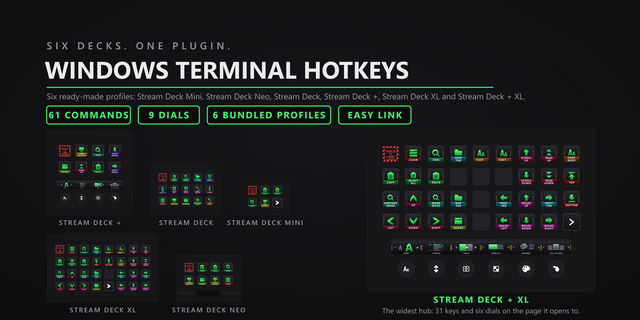
- macOS Terminal Complete, 15 keys: 12 pages, a hub of 11 category doors, one page per category, all 79 commands pre-placed.
- macOS Terminal Complete Plus XL, Stream Deck + XL: the same hub, six dials on every page, the Cursor dial and D-pad on the front page.
- macOS Terminal Complete XL, 32 keys: the same hub plus the cursor D-pad.
- macOS Terminal Complete Plus, Stream Deck +: four dials up front, Cursor included, with the D-pad row; its second page is keys only.
- macOS Terminal Complete Mini, 6 keys: 11 starter keys over 3 pages.
- macOS Terminal Complete Neo, 8 keys: a one-page starter set.
Easy Link rides every one of them.
WHAT'S INCLUDED
- 11 category actions covering 79 commands: pick the exact command in the property inspector and the key wears its artwork. Every key remappable, no config file to edit.
- 4 cursor D-pad keys that repeat on hold, like the keyboard keys they stand in for.
Works with the Terminal app 2.15 on macOS 13 or later. Requires the Stream Deck app 6.9 or newer.
Full Stream Deck control for Apple Terminal: 79 commands across 11 category actions, each remappable from the property inspector, plus 8 dials.
- 8 dials, led by Quick Commands (browse and run your own commands) and Cursor (walk the command line, press to paste)
- 6 bundled profiles: Stream Deck, Mini, XL, Plus, Neo, Plus XL. Both dial devices seat the Cursor dial on the front page.
- Shell-writing actions target the plugin's own Terminal window by default, never one you are working in
- A refused press flashes the key instead of failing silently
- Hold to confirm (600 ms) on the three commands Terminal cannot undo: Close All, Hard Reset, Clear Scrollback
- Easy Link: hold one key while Terminal is in front; the deck follows Terminal in and out of the profile
Requires macOS 13 or later and Stream Deck software 6.9 or later. Built against Terminal 2.15.
Version 1
Sep 1, 2026
Details
Type
Artistic
Business
Development
Monitoring
Productivity
Utilities
OS
Mac
Compatibility
Stream Deck 6.9 or later
Size
3.75 MB
Version
1
Language
English
Support
Profiles
Yes
Dial support
Yes
You might also like