Audio
Phone Link Hotkeys
Overview
Put your Android phone on your Stream Deck and Stream Deck +. Phone Link Hotkeys drives Microsoft Phone Link from real keys and three Stream Deck + dials: media transport, the Phone Link tabs, and the ringer, each with a live touch-strip readout.
EASY LINK, BUILT IN
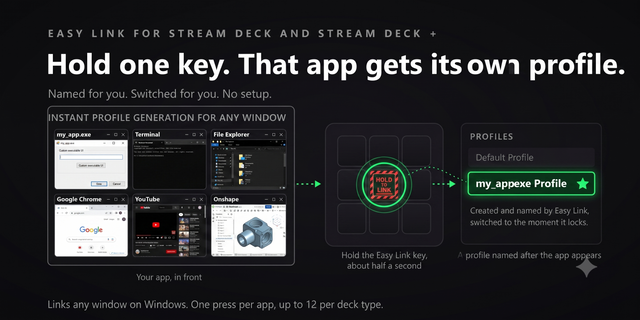
Hold the Easy Link key for about a second while Phone Link is in front, and the deck binds Phone Link to this plugin's profile. From then on the profile comes up whenever Phone Link takes focus, and your previous profile returns when you leave. No setup pages, no paths, no window titles to type. A short press does nothing, so a stray tap never relinks. Lock, fail and clear cues play out of the box.
STREAM DECK + DIALS
Three dials, mapped to what Phone Link actually exposes:
- Media: turn for previous and next track, press to play or pause. Tap the strip's left or right half to skip, long press to send the phone's audio to this PC. The strip is a live now-playing readout.
- Tabs: turn through the five Phone Link tabs, press for Back in a conversation or New message otherwise. Tap the chevrons to step one tab, long press to refresh sync.
- Ringer: turn to advance the ringer one step through volume, vibrate and silent, press for Do Not Disturb, tap to ring your phone. The strip shows the live ringer mode and a DND badge.
The fourth encoder is left free on purpose. No strip shows a guessed slider.
LIVE PHONE STATUS KEY
Battery percentage, connection state, and how fresh the last sync is, with SYNC LOST and DND ON badges. If Phone Link is minimized, closed, or its pane is collapsed, the key says so, and pressing it launches Phone Link, opens the pane, or re-syncs.
NOW PLAYING KEY
Whatever is playing on your phone, live on a key: source app, track, artist, and a PLAYING or PAUSED badge. Press to play or pause, even with Phone Link minimized.
REAL PHONE-SIDE TOGGLES THAT DON'T LIE
Do Not Disturb and ringer mode execute on the phone itself, seconds later. The plugin watches every round trip: the key shows a pending phase, then the confirmed state, and alerts if the phone never confirms. Ringer steps through volume, vibrate and silent, with a distinct face for each mode.
18 COMMANDS, 4 CATEGORIES
- Navigate: Messages, Calls, Apps, Photos and Settings tabs, plus Back out of any conversation.
- Phone Actions: new message, force re-sync, phone-screen mirror, ring your phone to find it, clear all notifications.
- Phone Toggles: Do Not Disturb, ringer mode, audio player panel.
- Media: play/pause, previous/next track, switch the phone's audio to your PC speakers.
NO FRAGILE KEYSTROKE INJECTION
Phone Link ignores synthetic keyboard shortcuts entirely, so this plugin sends none. Every command presses Phone Link's own buttons through Windows UI Automation, so it works with Phone Link minimized on another monitor and never collides with a hotkey.
PER-KEY SOUNDS
Every key can play a sound when you press it, with thirty sounds in the box. Pick one per key in the property inspector, or leave it silent. Pairs with our free Sound Sampler: record any sound on your PC and play it from any key.
ALSO INCLUDED
- Bundled 15-key profile with a category hub page: Easy Link, Phone Status and Now Playing pre-placed, one page per category, Home keys everywhere.
- Bundled Stream Deck + profile: the three dials on encoder slots 0 to 2, Easy Link, and seven starter keys.
- Property-inspector command picker per category, with each command's in-app shortcut for reference.
Version 2.1.0.0, Easy Link edition, 2026-08-05. No em-dashes.
<!-- BEGIN -->
Easy Link is now built into Phone Link Hotkeys, with nothing else to install.
Hold the Easy Link key for about a second while Phone Link is in front, and the deck binds Phone Link to this plugin's profile. From then on the profile switches in whenever Phone Link takes focus, and your previous profile returns when you leave. There are no setup pages, no paths, and no window titles to type. A short press does nothing, so a stray tap never relinks. Lock, fail and clear cues play out of the box.
Easy Link sits on the top-left key of both bundled profiles. On the Stream Deck + profile it takes the slot that previously held an eighth starter key, so that profile now carries Easy Link plus seven starter keys alongside the three dials.
Also in this release:
- Property inspector helper text is larger and lighter, so it is readable on the dark background.
- The bundled profiles are now verified as real archives at build time, so a corrupt profile can never ship.
Known issue, unchanged. Opening the Apps tab makes Phone Link pull your installed app list from the phone over Bluetooth. While that runs, Windows reports the app's controls slowly, so other keys and dials can lag for a few seconds. Switching tabs is not affected.
Version 2.1
Aug 5, 2026
Details
Type
Audio
Monitoring
Music
Productivity
Utilities
OS
Windows
Compatibility
Stream Deck 6.9 or later
Size
2.91 MB
Version
2.1
Language
English
Support
Profiles
Yes
Dial support
Yes
You might also like