Engagement
Quorum
Overview
Quorum puts your team on your Stream Deck. Everyone in your room gets a key — who they are, what they are doing, and for how long — and your own status is one press away. When anyone changes theirs, every other deck in the room updates in under a second. No window to open, no tab to check, no notification to dismiss.
It replaces the three seconds you spend deciding whether to interrupt someone: opening an app, finding a name, reading a green dot that only means a laptop lid is up. A status somebody chose on purpose, on hardware in the corner of your eye, is a far better signal.
YOUR STATUS — One key. Press to step to the next status; hold to come back to the first. Available, Focus, In a call, Lunch, Away and Off out of the box, and every label, colour, icon and emoji is yours to change. A status can end itself: Lunch goes back to Available after 45 minutes, with a ring counting down on the key.
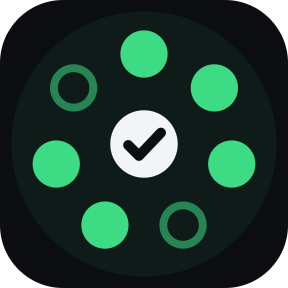
THE BOARD — Drop it on a row or a block of keys and your room is laid out across them, one person per key, in alphabetical order so nobody moves under your finger. A filled disc means they are here; a hollow ring means their Stream Deck is offline, so the board never claims someone is available when their laptop is shut. Teammates in another time zone show their local time.
KNOCK — Press someone's key and their deck flashes yours. No words, nothing stored.
SIGNAL — A short message on a key: "back in 5", "call me", "ship it". Press to send it to the room or to one person. It appears only on their Stream Deck — never in an app, a notification or on a screen being shared — and lands on your tile if they have one. They press it to say they saw it, and your key shows SEEN.
FOCUS MEANS IT — While you are in Focus, messages are held rather than shown, and the sender is told they are waiting. Leave Focus and they arrive.
QUORUM — One key that answers the question in the name: how many of the room are available, and is that enough to start? The ring has to pass the notch. Press it to see who is counted.
WATCH — Pin one person to one key: your pair, your lead, the one you actually look for.
PRIVATE BY CONSTRUCTION — Names, statuses and messages are encrypted on your machine with a key derived from the room code, which never leaves your Stream Deck. Direct messages are sealed again to the one person they are for. The service that connects your team sees that a room exists and how many are in it — never a name, a status or a word.
NOTHING BESIDE IT — No helper app, no background process, no Accessibility, Screen Recording, camera or microphone permission. Quorum never detects anything: every status is one a person chose. No account, no analytics, no message history.
EASY TO SHARE — Start a room and copy the invite link. It opens a page that shows the code and where to paste it. A mistyped code is caught as a typo before anything is sent.
Each person in a room needs their own copy. Needs an internet connection. Works on any Stream Deck with keys, on macOS and Windows, with the Stream Deck app 7.1 or newer.
First release.
Your Status: press to change, hold to come back. Six statuses out of the box, every one editable, and statuses that end themselves.
Team Board: your room across a row or block of keys, one person per key. Filled when they are here, hollow when their deck is offline, with local time for teammates elsewhere.
Knock: press someone's key and their deck flashes yours.
Signal: a short message on a key, to the room or to one person, shown only on their Stream Deck. Receipts tell you when it was seen.
Focus holds messages until you leave it, and tells the sender.
Quorum: how many are available, and whether it is enough to start.
Watch: one teammate, pinned to one key.
Rooms are shared with one invite link. No account. A mistyped code is caught before anything is sent.
End-to-end encrypted: names, statuses and messages are sealed on your machine. The room service cannot read them.
No helper app and no system permissions. One encrypted connection, and nothing else.
Version 1
Sep 25, 2026
Details
Type
Engagement
Gaming
Monitoring
Productivity
OS
Mac
Windows
Compatibility
Stream Deck 7.1 or later
Size
154.5 KB
Version
1
Language
English
Support
Profiles
No
Dial support
No
Neo Infobar support
No
You might also like