Gaming
Race Deck for Assetto Corsa
by GRAMSHIFT
Overview
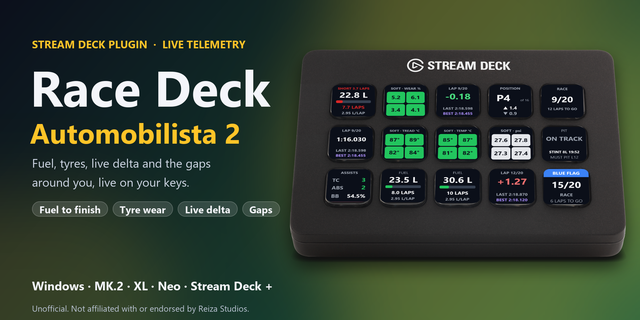
Race Deck puts live Assetto Corsa (AC) telemetry on your Stream Deck keys while you drive: laps of fuel left, tyre wear (tire wear), temperature and pressure, a live delta to your best lap, and traction control (TC), ABS and brake bias. Press a key to send the game key you choose, such as TC, ABS or brake bias up and down, and your Stream Deck becomes a sim racing button box with a live dashboard on Windows. Made for the original Assetto Corsa (AC1). More keys read your lap time, last and best lap, position, laps to go, flags, the pit window and your stint. Start the game from its launcher or Content Manager and drive: fuel per lap and the delta are measured on your own laps.
Features
Fuel: litres or US gallons with a tank bar, laps of fuel left and fuel per lap from your recent clean laps. In a race they are checked against the laps to the flag (timed races too): red with SHORT 1.4 LAPS when it will not last, yellow under a lap to spare
Tyres: the four tyres in their corners as colors, with the compound: the game's tyre wear value (100 = new), surface or core temperature (C or F), or pressure (psi, kPa or bar)
Lap Times: the live delta to your best lap, green when ahead, red when behind, or the current lap time, with your last and best lap
Position: your place and the cars in the session, the lap of the race, and a time penalty when you have one
Session: time left, or the lap of a lap race with the laps to go, the session (practice, qualifying, race, hotlap...) and the flag: blue, yellow, black, white, checkered or penalty
Pit & Stint: pit lane, pit box and LIMITER, the laps and driving time of your stint, the mandatory pit window and PIT STOP DONE
TC / ABS / Brake Bias: traction control and ABS on or off, and the brake bias in percent to the front
Button box: every key can send a game key you choose (such as F13 or Ctrl+Shift+P), by default only while the game is in front, so presses stay out of your other windows
English and Japanese
Setup
Drag the keys you want onto your Stream Deck. On track, they show your car
To send keys, enter a key in the key's settings and bind the same key in the game's controls, such as TC, ABS or brake bias up and down. F13 to F24 avoid clashes
The Status line in each key's settings shows what the key reads and the last key it sent
Privacy
Runs entirely on your PC and only reads the race data the game shares. Nothing is written to the game or sent over the network. No account, no analytics.
Requirements
Windows 10 or later, Stream Deck app 6.9 or later, Assetto Corsa on PC
Limitations
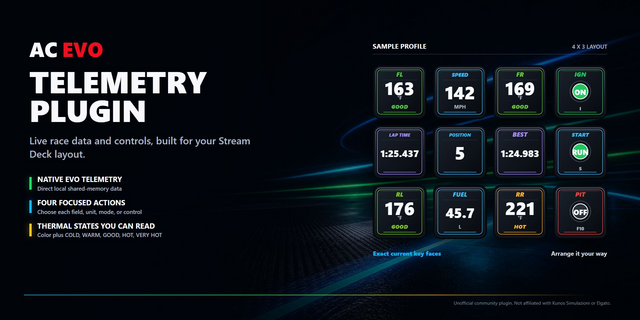
Reads the original Assetto Corsa on the same Windows PC as your Stream Deck. Assetto Corsa Competizione and Assetto Corsa EVO are not read: the keys show UNSUPPORTED or NO GAME, never wrong numbers
The game shares your own car only: no gaps to the cars ahead and behind
TC and ABS show ON or OFF: the game shares the assist setting, not the level number
NO GAME: the game is closed. NO SESSION: the menu. REPLAY: a replay. STALE: the data stopped changing for 3 seconds. NO FUEL USE: fuel use off in the game
Fuel per lap needs one full lap without a pit lane visit. The delta needs a best lap the plugin saw from line to line; laps with three wheels off do not count. Both restart with a new session, track or car
STINT -- until you first leave the pit lane (a race seen from the grid counts from the start)
Sent keys do not reach a game running as administrator: start it normally (the display keys still work)
If a press is not sent (game not in front, or anti-cheat hid the program name), the Status line says why: set Game program or turn off the active-window check
Ideas for new keys, or a bug? Use the Support link.
Unofficial: not affiliated with or endorsed by Kunos Simulazioni or 505 Games. Assetto Corsa is a trademark of its owners.
Fuel key in races: SHORT n LAPS now shows on your last stint, once a full tank would reach the flag. Earlier in a long race the key keeps its usual colours instead of staying red until your fuel stop. Timed races: the laps to the finish now follow the leader's flag. When you are not in P1 you may have one lap more to drive: SHORT n LAPS in red means the fuel will not reach the finish even without that lap, and a yellow SHORT n IF +1 means only that lap is at risk. After you finish, the fuel key no longer warns about the cool-down lap.
Version 1.0.1
Oct 19, 2026
Details
Type
Gaming
Utilities
OS
Windows
Compatibility
Stream Deck 6.9 or later
Size
1004.28 KB
Version
1.0.1
Language
English
Japanese
Support
Neo Infobar support
No
Profiles
No
Dial support
No
Additional links
You might also like