Business
Screen Capture for CleanShot
by Magoo
Overview
Clean Shots Every Time.
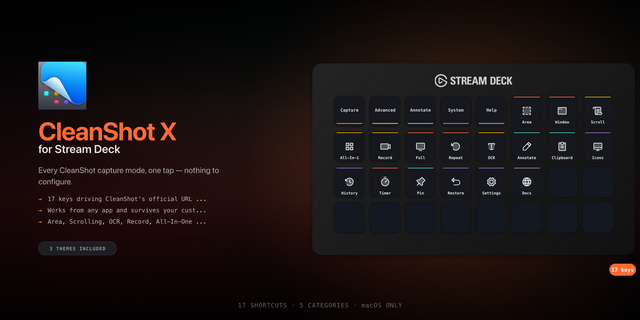
Screen Capture for CleanShot puts 20 capture and utility actions at your fingertips, so you can start common CleanShot workflows without opening menus or remembering shortcuts. Capture an area, window, full screen, or your previous selection; launch scrolling capture, self-timer, screen recording, OCR, annotation, pinning, history, settings, and more from a single key.
Ready-to-use actions include:
All-In-One
Capture Area, Previous Area, Fullscreen, and Capture Window
Self-Timer and Scrolling Capture
Record Screen and OCR Text
Pin File, Annotate File, and Annotate Clipboard
Toggle, hide, or show desktop icons
Quick Access Overlay
Open History, Restore Recent, and Open Settings
Need more control? The configurable CleanShot Command action lets you choose any supported CleanShot URL-scheme command and tailor command-specific options such as the after-capture action, file path, capture geometry, display, scrolling behavior, OCR line breaks, and settings tab.
Actions work inside Stream Deck Multi Actions, making it easy to combine CleanShot with the rest of your workflow. The property inspector is bundled with the plugin, and commands run locally through CleanShot's official URL scheme. The plugin does not require an account, API token, or remote service.
Requirements: • CleanShot X • macOS 12 or later • Stream Deck 7.1 or later • Stream Deck keypad controller
Some commands require newer versions of CleanShot X. File-based actions require a valid local image or video path. CleanShot X is sold separately. Check out the download link to get yours today.
Screen Capture for CleanShot is an independent third-party plugin and is not directly endorsed by CleanShot. Downloaded link opens an commission-based link.
Initial release of Screen Capture for CleanShot.
Adds 20 dedicated Stream Deck actions for CleanShot capture, recording, OCR, annotation, pinning, desktop icons, overlays, history, restore, and settings.
Adds a configurable CleanShot Command action with command-specific options for after-capture behavior, file paths, geometry, display selection, scrolling capture, OCR line breaks, and settings tabs.
Supports Stream Deck Multi Actions for combining CleanShot commands with other tasks.
Includes a fully local property inspector with contextual settings and setup guidance.
Opens CleanShot URL commands correctly through macOS.
Preserves settings for each individual action and handles file paths containing spaces.
Provides clear alerts when required file-based settings are missing.
Requires CleanShot X, macOS 12 or later, and Stream Deck 7.1 or later. Some commands require newer CleanShot X versions.
Version 1
Sep 29, 2026
You might also like