Utilities
NaN Dashboard
by RefactorIA
Overview
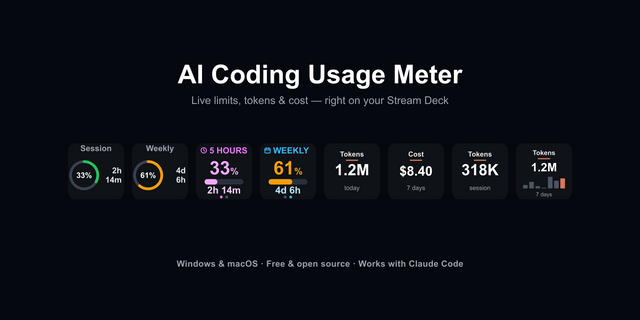
Track your NaN AI usage right from Stream Deck. A live quota dial for Stream Deck+, plus keypad tiles for per-model consumption and token totals. Your session is imported securely from Chrome and stored in the macOS Keychain. No telemetry, ever.
What you get
NaN Usage dial (Stream Deck+) — see your remaining quota at a glance. Touch to refresh, with high-contrast warning levels when you run low.
NaN Model Usage (Stream Deck & Stream Deck+) — a live tile for one model of your choice: percent used, capacity and reset date.
NaN Total Tokens & NaN Monthly Tokens (Stream Deck & Stream Deck+) — all-time and month-to-date token totals, refreshed automatically.
NaN Dashboard — one key to open your NaN dashboard in the browser.
Bonus monitors (no NaN account needed) — Claude Code and OpenAI Codex usage dials, plus an experimental Grok monitor, read from their locally installed, signed-in CLIs.
Getting started
Install the plugin and drag a NaN action onto a dial or key.
Select it and click Import session from Chrome in its configuration panel.
Done. Your usage updates automatically.
Privacy-first
Session import happens only when you click the button. Nothing is imported silently.
Your session is validated and stored in the macOS Keychain, never in plugin settings.
The only network traffic is to the NaN Dashboard API, using your own session.
No cookies, tokens or credentials ever appear in logs, UI or error messages.
Full policy: https://github.com/refactor-ia/streamdeck-nan/blob/main/PRIVACY.md
Requirements
macOS 13 or later
Stream Deck app 7.1 or later
Google Chrome signed in to your NaN account (for NaN actions)
Stream Deck+ for dial actions; keypad actions work on any Stream Deck
Open source: https://github.com/refactor-ia/streamdeck-nan Support: https://github.com/refactor-ia/streamdeck-nan/issues
What's new in v1.0.11
First Marketplace release. Track your NaN AI usage from Stream Deck and Stream Deck+.
NaN Usage dial (Stream Deck+): remaining quota with high-contrast warning levels. Touch to refresh.
NaN Model Usage, Total Tokens and Monthly Tokens: live keypad tiles that refresh automatically.
NaN Dashboard: one key to open your dashboard in the browser.
Bonus monitors: Claude Code and OpenAI Codex usage dials, plus an experimental Grok monitor.
Secure session import: import your NaN session from Chrome with one click. It is validated and stored in the macOS Keychain, never in plugin settings.
Changes since v1.0.10
All action icons are now white monochrome, following Elgato's design guidelines.
The installer preserves the Keychain helper's executable permissions, required for session import.
Existing actions and saved sessions remain unchanged.
Version 1.0.11
Sep 17, 2026
Details
Type
Utilities
OS
Mac
Compatibility
Stream Deck 7.1 or later
Size
252.58 KB
Version
1.0.11
Language
English
Support
Profiles
No
Dial support
Yes
Additional links
You might also like