Gaming
Steam Friend Status
by Dloper
Overview
Your Steam friends, a glance away.
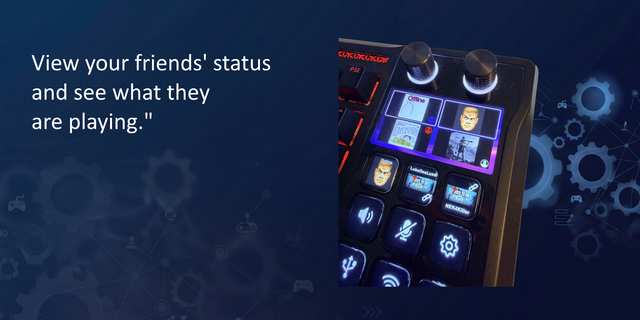
Steam Friend Status puts a friend's avatar, online status and current game directly on a Stream Deck key. Build a row for your regular squad and see what Steam reports without switching windows.
• A familiar face on every key: displays the configured friend's Steam avatar.
• Readable presence: dim artwork for offline status and a green indicator for online status.
• See what's playing: a blue border and game label when Steam supplies a current game.
• Reach out with a press: request a conversation in the Steam desktop client. No message is sent automatically.
• Set up once: save your Steam API key globally, then choose a different Steam ID64 for each key.
• Shared updates: visible friend lookups are batched every 45 seconds to reduce requests to Steam.
Requires macOS 13 or later or Windows 10/11 (x64), Stream Deck 6.9 or later, an internet connection and your own Steam Web API key. Steam must be installed to handle chat shortcuts. Works with Stream Deck keypad buttons, including Stream Deck + keys.
Availability depends on Steam's API and each friend's privacy settings. An API key does not bypass private profiles or hidden game details. Status refreshes periodically rather than instantly. Chat shortcuts do not guarantee joining a game.
Steam Friend Status is an independent Dloper plugin and is not affiliated with or endorsed by Valve.
Version 1.0.0.0 — Initial release
• Track a configured Steam friend's avatar, presence and current game on a Stream Deck key.
• Show offline, online and in-game artwork with readable status overlays.
• Share one Steam API key across all configured friend keys.
• Batch active friend lookups and refresh periodically.
• Open a Steam conversation request from a key press.
• Include a Dloper family property inspector and setup/support guides.
• Prepare nine locale catalogs with English fallbacks for external translation.
• Support macOS 13+ and Windows 10/11 (x64).
Version 1
Sep 21, 2026
You might also like